News
Opt out of AI Overviews? One site did, and clicks held
Should you opt out of AI Overviews? One site did and lost hundreds of thousands of impressions a day, not clicks. Our data on 3,674 citations shows why.

· 9 min read
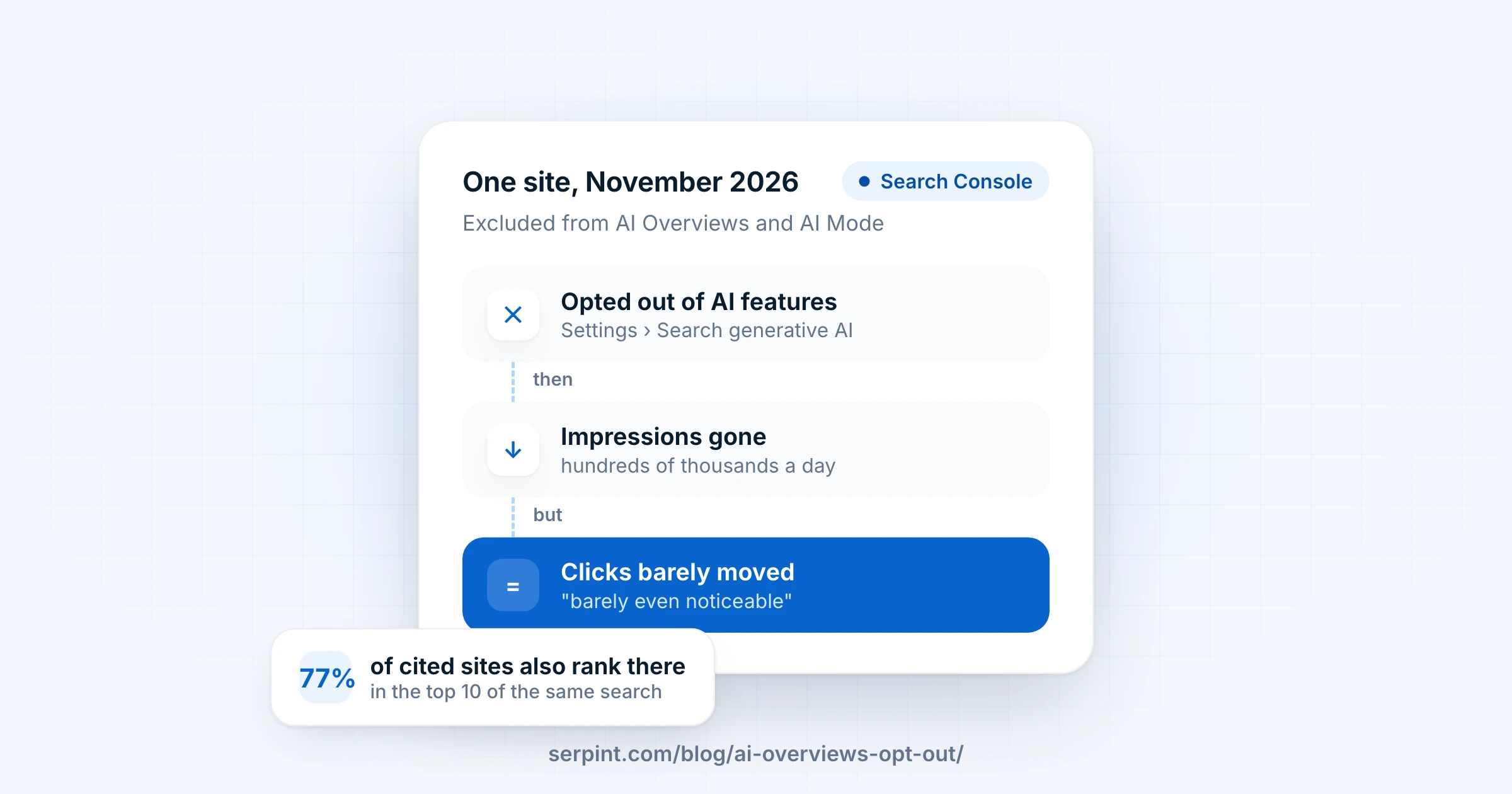
Should you opt out of AI Overviews? One site did in November 2026 and lost hundreds of thousands of impressions a day. Its clicks barely moved. Our data shows why: 77% of the time an AI Overview cites a site, that site also ranks in the same search’s top 10.
✅ My advice Don’t opt out to win clicks back: this site got none back. Opt out only if you don’t want Google’s AI answers built from your pages, and mark the day you switch so your reports don’t fool you.
Here’s what happened, what the setting does, and why the numbers split the way they did.
What happened when a site opted out of AI Overviews?
The site switched off Google’s AI features with Search Console’s new control, and its impressions fell while its clicks held. An SEO consultant shared the case on November 22, without naming the site, its numbers or the date it switched.
His Search Console screenshot shows the banner “Your property is excluded from generative AI features on Google Search” over three months of data. On clicks, he wrote, the change was “barely even noticeable”.
It’s one site and one screenshot, so treat it as a case, not proof. But the split follows from how Search Console counts AI Overview links, which is worth knowing before anyone copies it.
First, what the switch actually does.
What does Search Console’s AI opt-out do?
The Search generative AI control takes your site’s links and content out of AI Overviews, AI Mode and the generative AI features in Discover. It sits in Search Console under Settings, then Search generative AI, and Google rolled it out to every site by August 31, 2026.
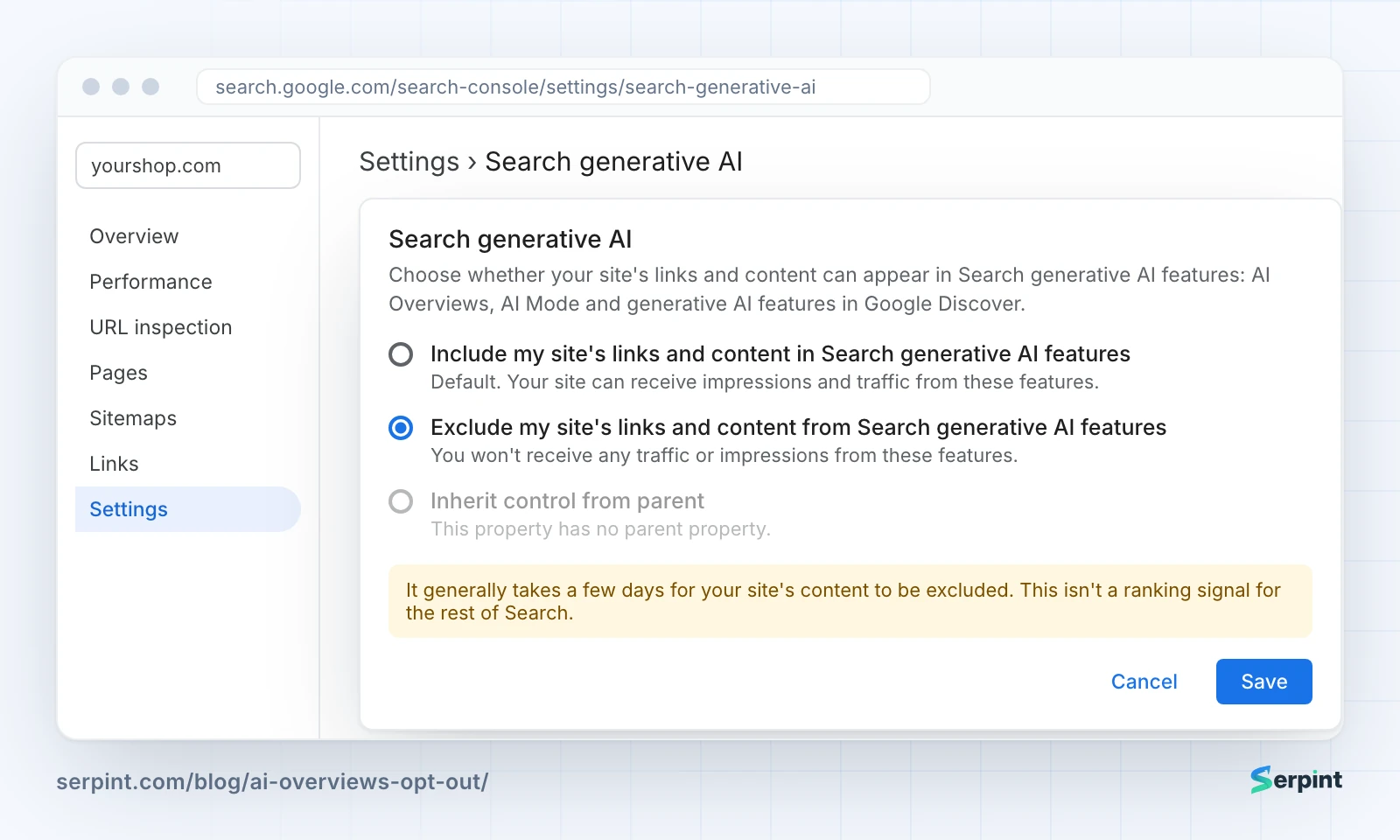
Search Console’s Search generative AI setting, redrawn with sample data.
You get three choices: include your site (the default), exclude it, or inherit the setting from a parent property. Google says exclusion applies within one to two days, and that the setting isn’t a ranking signal for the rest of Search.
It doesn’t stop AI training, which is still Google-Extended’s job, as Google’s ranking hub spelled out this week. And it covers the whole property for now. Page-level controls are due by March 3, 2027 under the UK’s new rules.
So the site vanished from Google’s AI answers. Why didn’t its traffic notice?
Why did impressions vanish but clicks barely move?
Search Console counts one impression per search for your whole site, at your best position, and gives every AI Overview link the overview’s own position. So when you’re cited and also rank in the top 10, an opt-out keeps the impression. It just moves to your organic listing.
We checked how often that happens, in 634 AI Overviews from clean US results pages on November 24, 2026. 77% of the time an AI Overview cites a site, that site also ranks in the same search’s top 10. 36% of the time it ranks in the top three.
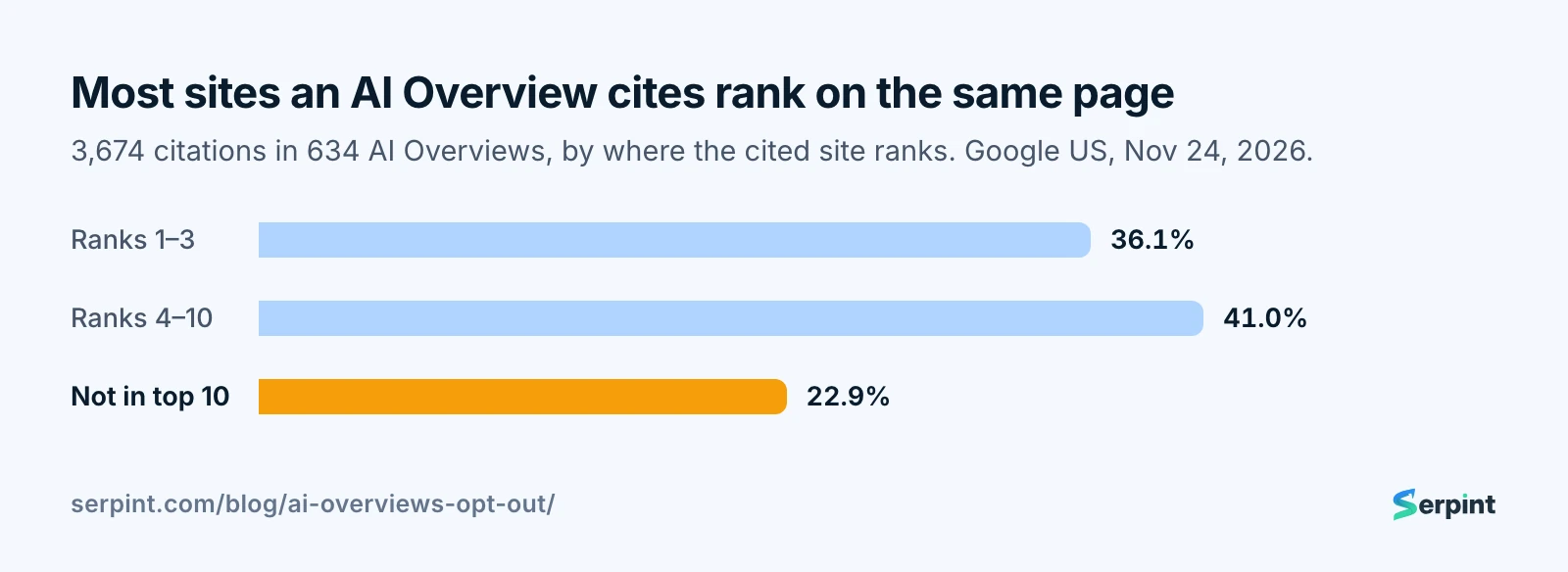
Data: Serpint’s check of Google US results pages, November 24, 2026. YouTube and Google’s own pages left out.
The other 23% are what an opt-out deletes outright: searches where your only link was inside the overview. Those links sit mostly behind the “Show all” button. Only 8% of sites in an overview’s first three cards don’t rank, against 35% of the sites further down.
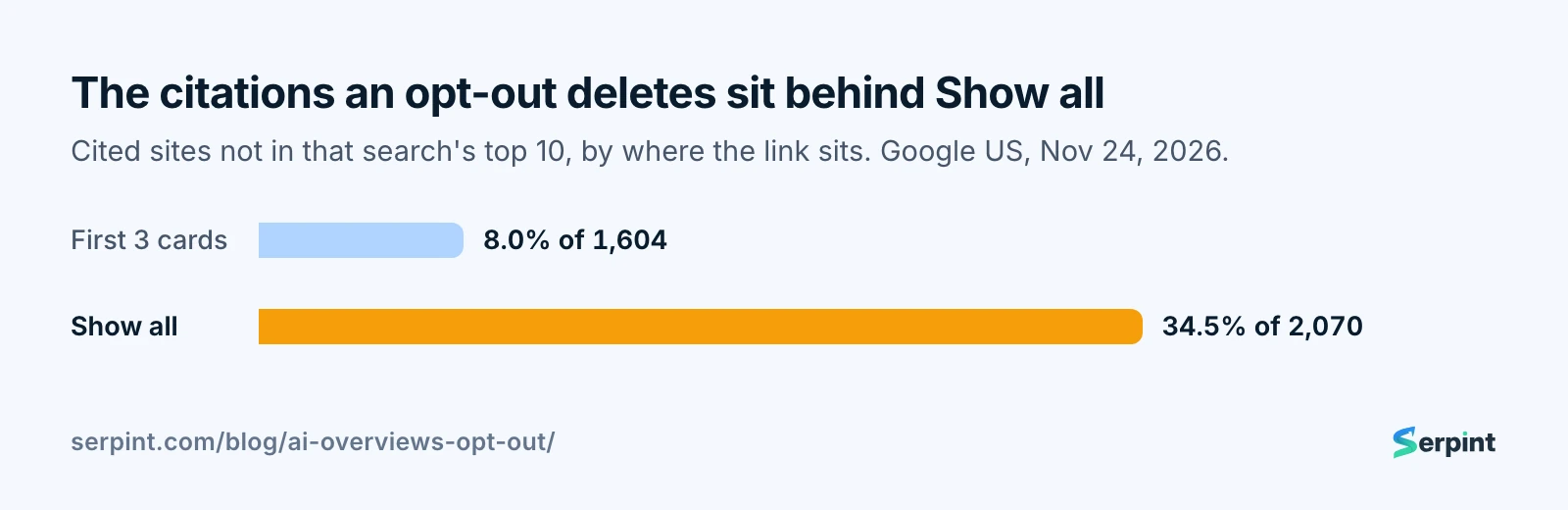
Data: Serpint’s check of Google US results pages, November 24, 2026.
A link behind “Show all” on a search you don’t rank for was never going to send many clicks. Lose thousands of them and you get exactly this case: a big drop in impressions and almost no visitors gone.
💡 My take An AI Overview impression mostly counts your link a second time, on a page where you already rank. Opting out deletes that second count, not visitors. That’s also why the site won no clicks back: people who wanted to click were already clicking its organic listing.
The numbers that do change are the ones people misread.
What will Search Console show after you opt out?
Expect impressions to fall, click-through rate to rise and average position to get worse, with clicks about where they were. None of it means your rankings changed.
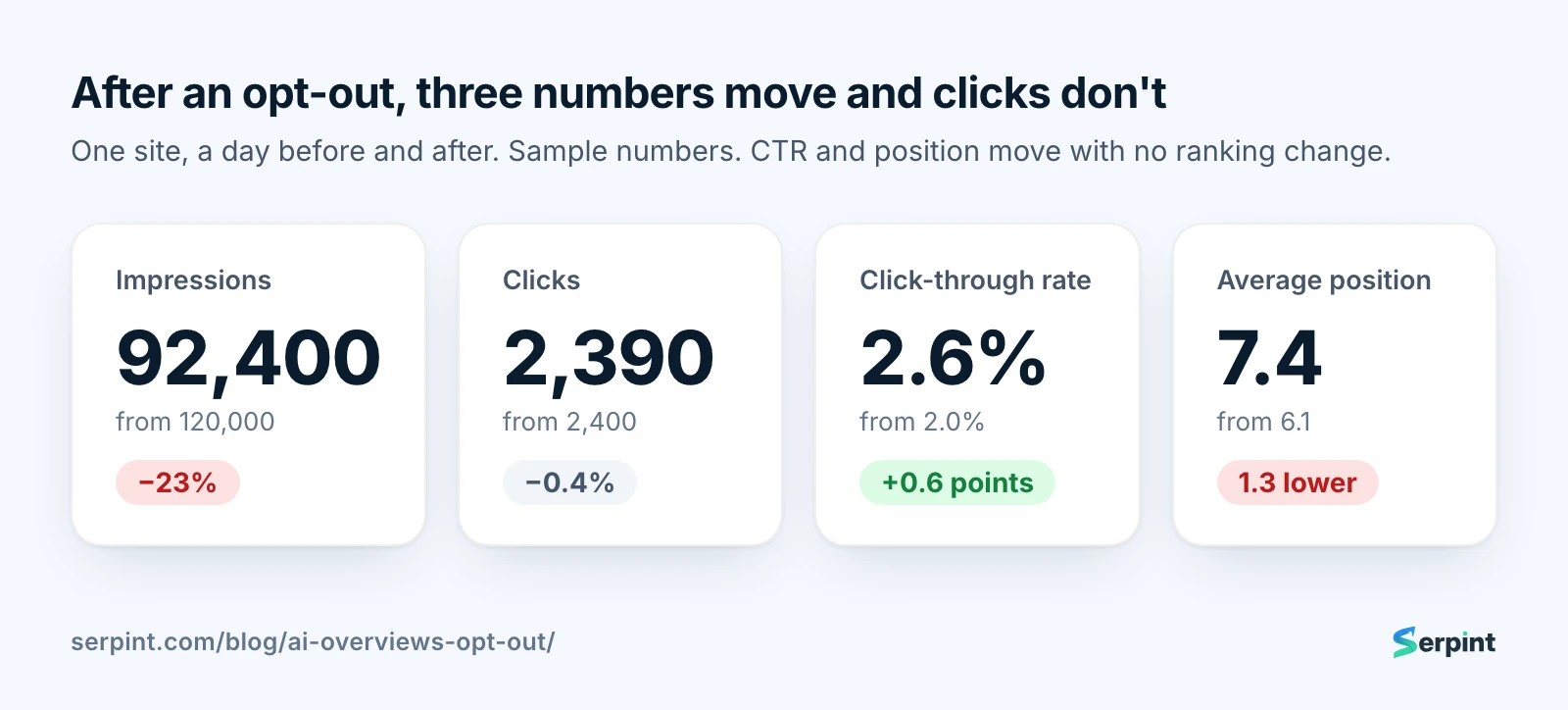
Sample numbers, not the case site’s.
CTR rises because the impressions you lost had almost no clicks. Average position worsens because, on searches where you were cited, your best spot drops from the overview to your organic listing.
The Generative AI report tells you nothing either way. It only ever counted impressions by page, country, device and date, with no clicks, and Google says an excluded site may not see it at all.
Which leaves the real question: is an opt-out worth doing?
Should you opt out of AI Overviews?
For most sites, no. In this case the opt-out cost visibility and won back nothing. On searches you rank for, your link in the overview sits above your organic listing. I’d keep it on unless you have a reason that isn’t traffic.
The reason that holds is control over your content. If you don’t want Google’s answers built from your pages, this is the one switch that keeps you in Search while taking you out of them. Publishers in talks over AI use are the obvious case.
Know what goes with it. Discover’s AI features go too, and Search Engine Journal raised whether Top Stories shown inside AI Overviews would follow; Google’s help page doesn’t say. And on the 23% of citations where you don’t rank, the overview was your only spot on the page.
If you do switch, set it up so you can read the result.
How do you test an opt-out without fooling yourself?
Test an opt-out like any site change: mark the day, wait out the switch, then compare clicks, not impressions. These are the six steps.
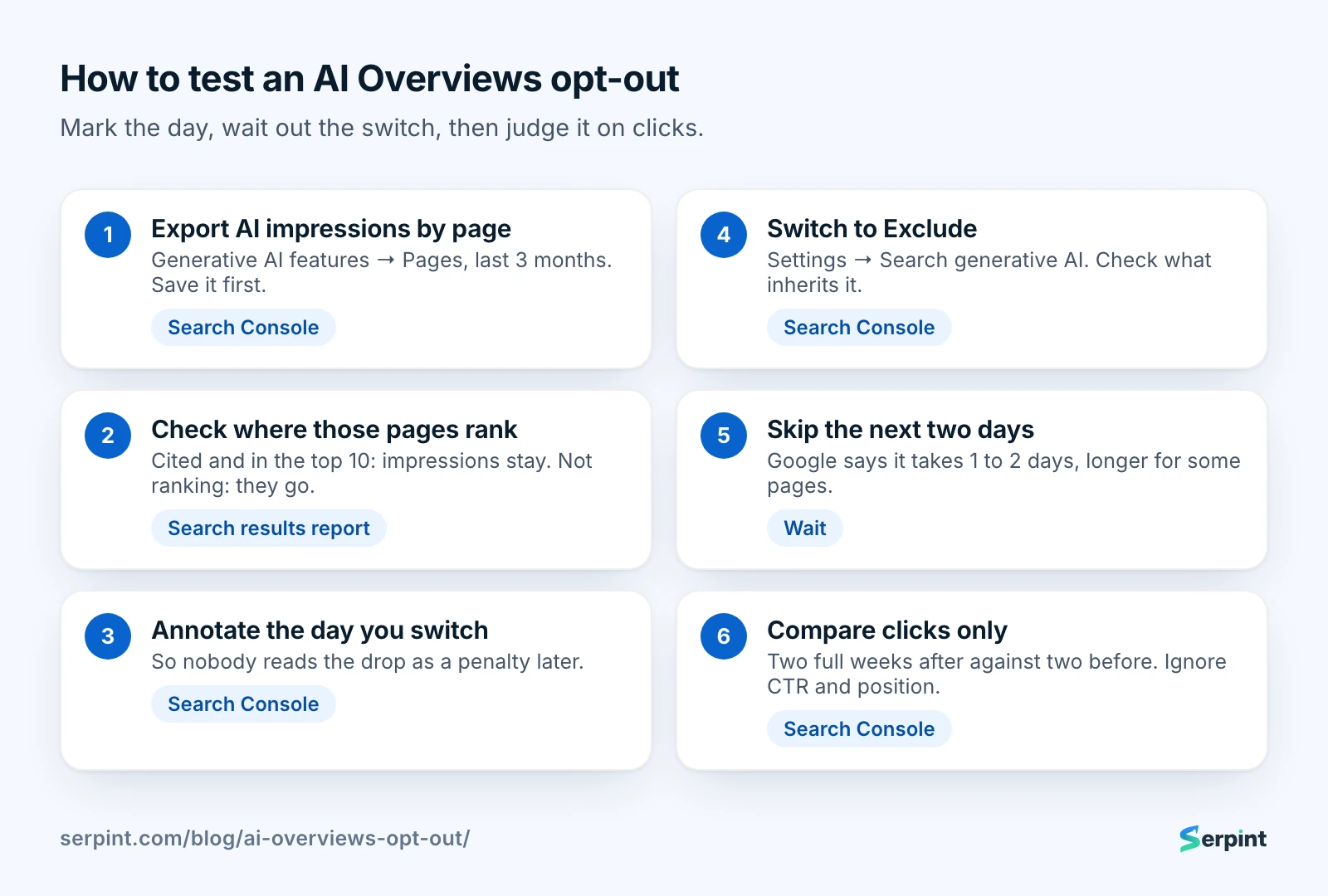
Step 1: export your AI impressions by page. In Performance, open Generative AI features, pick the last 3 months and export the Pages table. Save it before you switch, since an excluded site may lose the report.
Step 2: check where those pages rank. In the Search results report, filter each page with AI impressions and look at its queries’ positions. Cited pages that rank in the top 10 keep their impressions; pages that don’t will lose them.
Step 3: annotate the day you switch. Add a note on the Performance chart, so nobody reads the drop as a penalty later.
Step 4: switch to Exclude. Open Settings, then Search generative AI. Check whether other properties inherit it: a domain property’s setting covers its URL-prefix properties unless they set their own.
Step 5: skip the next two days. Google says exclusion takes one to two days, and longer for some pages. Leave those days out of any comparison.
Step 6: compare clicks only. Compare the first two full weeks after with the two weeks before, on the same pages. Ignore CTR and average position, since both move on their own.
That’s two exports and a lot of filtering to find out which cited searches you rank for. Serpint already keeps that list.
How can Serpint show what an opt-out would cost?
Serpint checks your tracked keywords and records whether each one’s AI Overview cites you, next to your position and Search Console clicks. Cited keywords where you rank below 10 are the impressions an opt-out deletes. Cited keywords in the top 10 keep theirs.
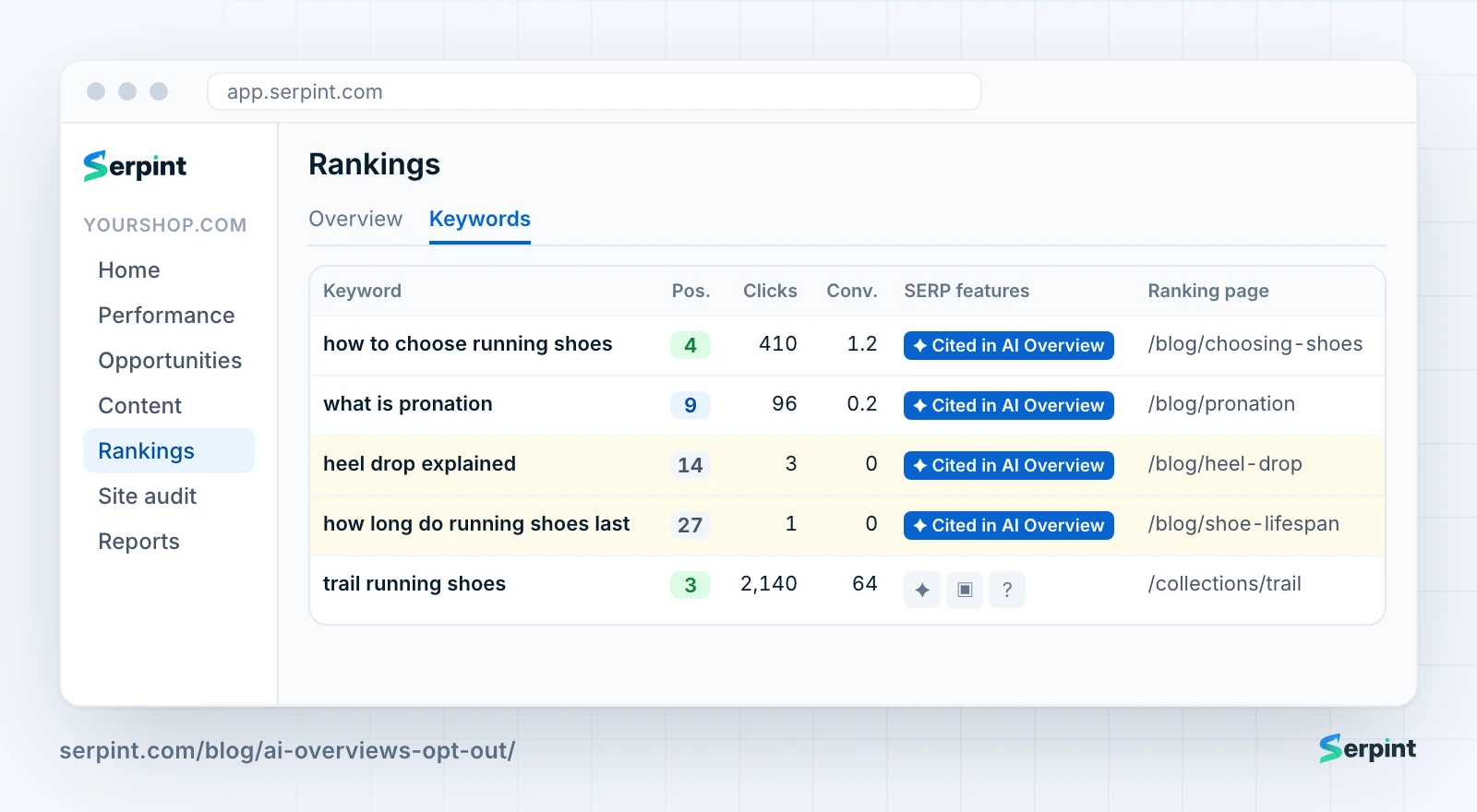
In the Rankings overview, the SERP features card counts how many of your keywords show an AI Overview and how many cite you. Opportunities lists the top-10 keywords whose overview doesn’t cite you yet, the ones to work on if you stay in.
An opt-out only covers Google. For articles you mark as published, Serpint also checks whether ChatGPT cites the page a week later, then every 30 days.
How much any of this matters depends on your kind of site.
What does it mean for your kind of site?
Publishers have the strongest case to opt out, because the answer is their product. This case suggests the clicks don’t come back, though, so treat it as a stand on how your content is used, not a traffic play.
Online stores should stay in. On shopping searches, AI Overviews already lean on Google’s own shopping pages, as our Black Friday check found, and an opt-out hands your spot to them and to other stores.
SaaS and B2B sites get cited mostly on definitions and how-tos, where they usually rank anyway. Opting out would mostly delete numbers from a report.
Local businesses have little to decide: only 31% of the local searches in our AI Overview check showed an overview at all.
A few things about this case nobody knows yet.
What don’t we know yet?
We don’t know the site, its numbers, or which report the lost impressions came from. In the Generative AI report, all of them go; in the main Performance report, only searches where the site didn’t rank. We also don’t know whether its clicks were measured site-wide or on the affected pages.
Our 634 overviews are popular searches, not one site’s long tail. A site cited on many searches it doesn’t rank for would lose more than 23% of its AI impressions, and still few clicks.
Click data may settle it. The UK’s rules ask Google for clicks and click-through rates from AI features, with its obligations starting December 3, 2026. If those figures reach Search Console, I’ll update this post with what they show.
What should you do now?
What you should do now is mostly measure, not switch. In order:
- Leave the control on Include unless you have a reason that isn’t traffic.
- Export your Generative AI report by page now, while you can see it.
- Check how many of your cited searches you also rank for in the top 10.
- If you opt out, annotate the day, skip the first two days, and judge it on clicks.
- Watch for click data in Search Console’s AI reports from December.
Founder of Serpint
Founder of Serpint. 6+ years in SEO and content marketing and 2 in GTM engineering, most recently as Head of Product and Content at lobstr.io, a B2B SaaS web scraping platform, until October 2026. Writes about SEO, AEO and GEO, the full stack of search and AI answer optimization, and content marketing.