News
AI visibility fell 62% after a blog purge. Clicks rose 14%
A site deleted its blog posts: AI impressions fell 62%, clicks rose 14%. Our data on 5,897 AI Overview citations shows why, and how to measure AI visibility.

· 9 min read
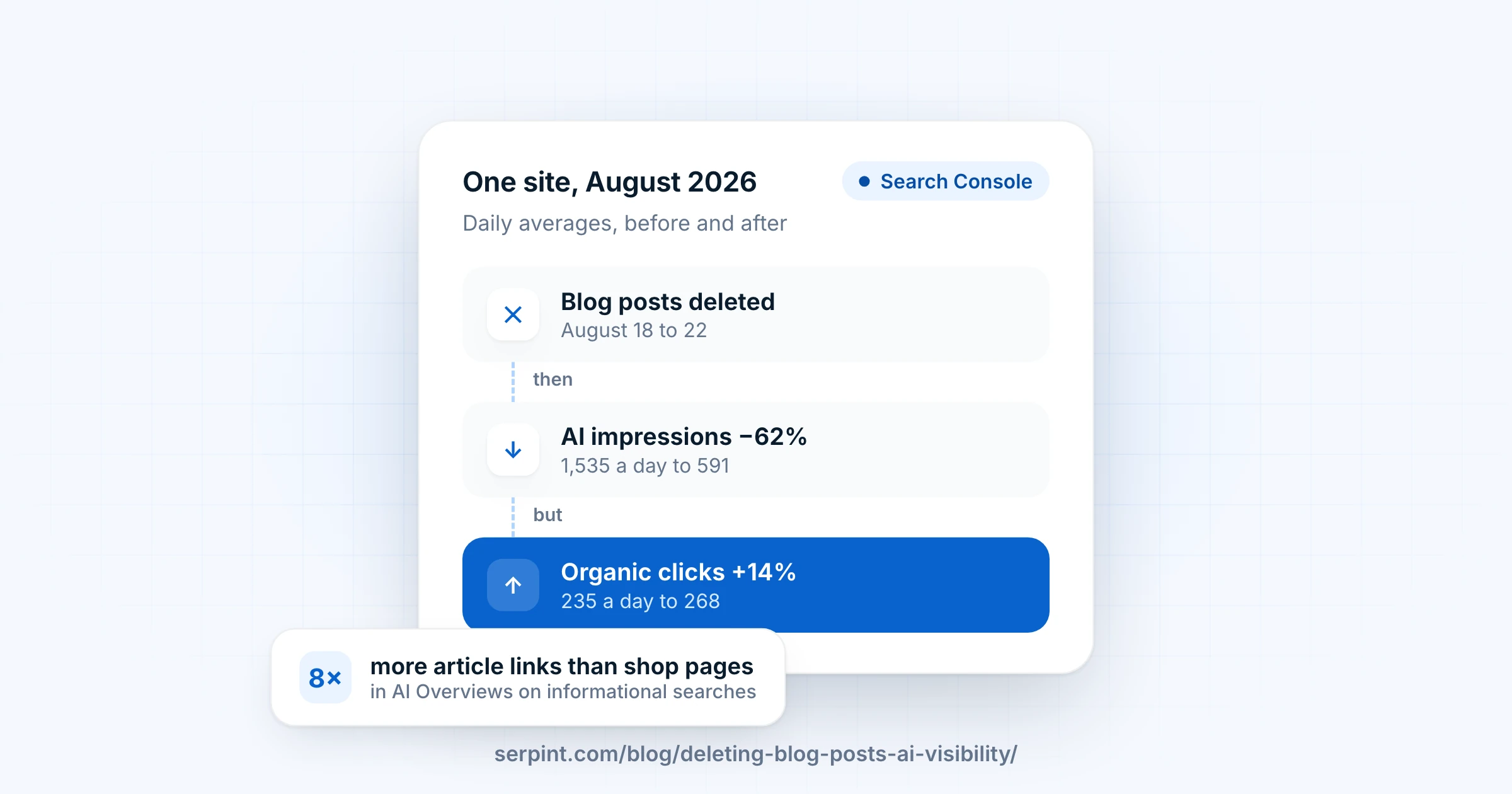
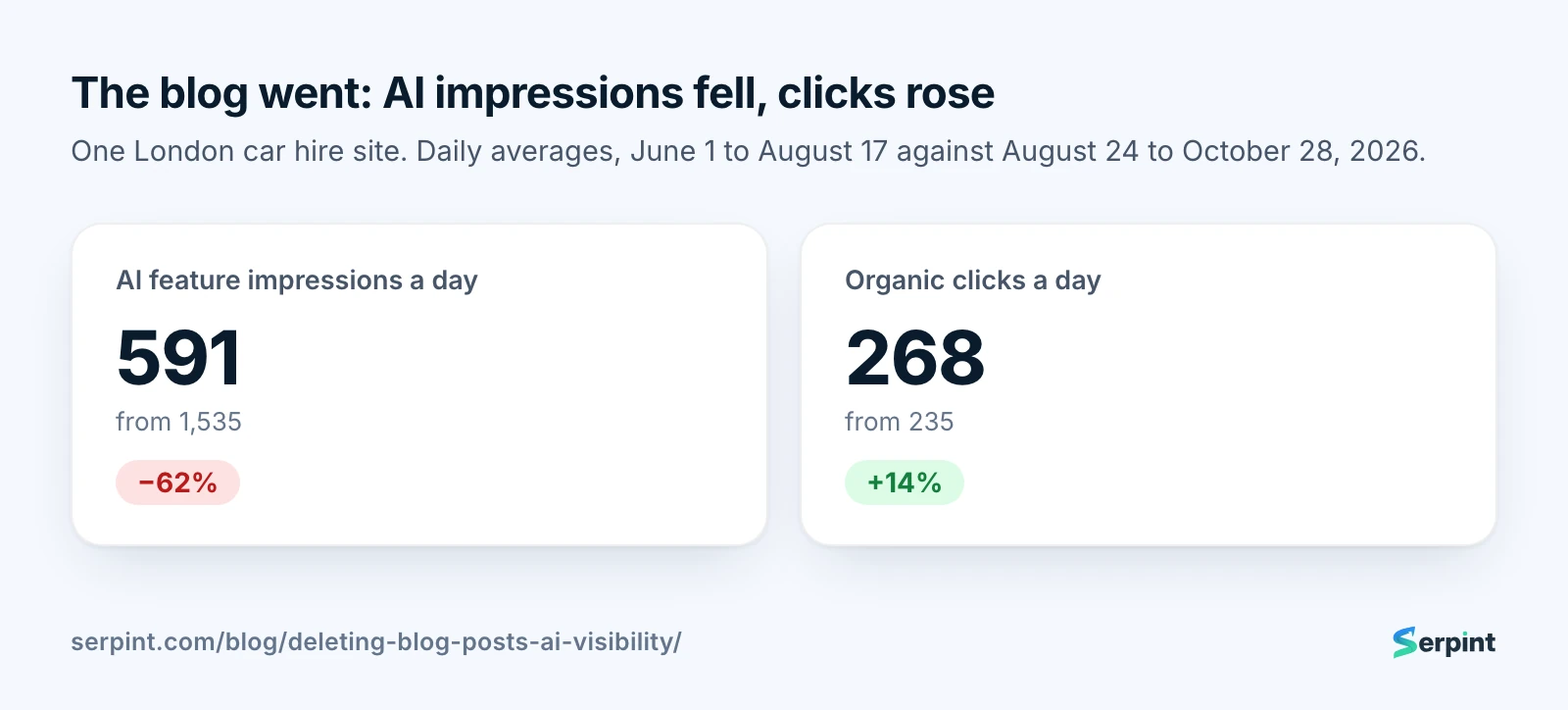
A London car hire site deleted a batch of blog posts in August 2026. Its AI-feature impressions in Google fell 62%, and its organic clicks rose 14%. Our AI Overview data explains the split: AI visibility comes mostly from articles, while buyers click other pages.
✅ My advice Don’t keep or cut content on AI visibility alone. Join Search Console’s Generative AI report with its Performance report, page by page, and decide on clicks and conversions.
Data: the site’s Search Console, via Search Engine Land.
Here’s what happened, why our data says it was predictable, and how to measure AI visibility without fooling yourself.
What happened when the site deleted its blog posts?
The site lost most of its AI impressions and gained clicks. The posts came down between August 18 and 22, 2026. From June to late October, AI impressions fell from 1,535 a day to 591, while clicks rose from 235 a day to 268.
The case study, published by Search Engine Land on November 19, is honest about its limits. Other changes went live too, and clicks move with the season. So it doesn’t prove that deleting posts raises clicks. It proves that AI impressions and clicks can move in opposite directions.
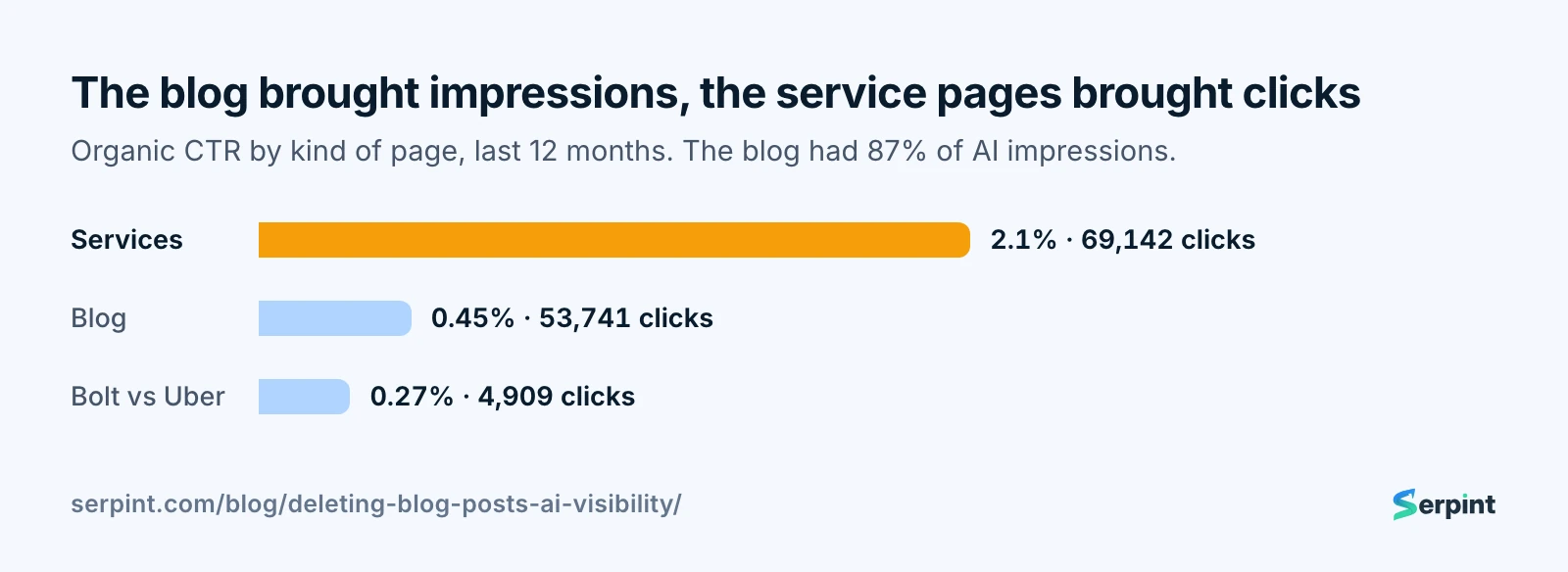
The page-level numbers show why. Of 420 pages with AI impressions over 12 months, blog posts were 36% of the pages but earned 87% of the impressions. One Bolt vs. Uber pricing post had a quarter of them on its own.
Data: the site’s Search Console, via Search Engine Land.
The blog brought visibility, and the service pages brought business. Blog posts turned 12 million search impressions into 53,741 clicks (0.45%). Service pages turned 3.3 million into 69,142 clicks (2.1%).
Some of that AI visibility was in the wrong market, too. 18% of the AI impressions came from the US, where nobody hires a London car.
A single site could be a fluke, so we checked the pattern across 1,500 searches.
Why does deleting blog posts cut AI impressions but not clicks?
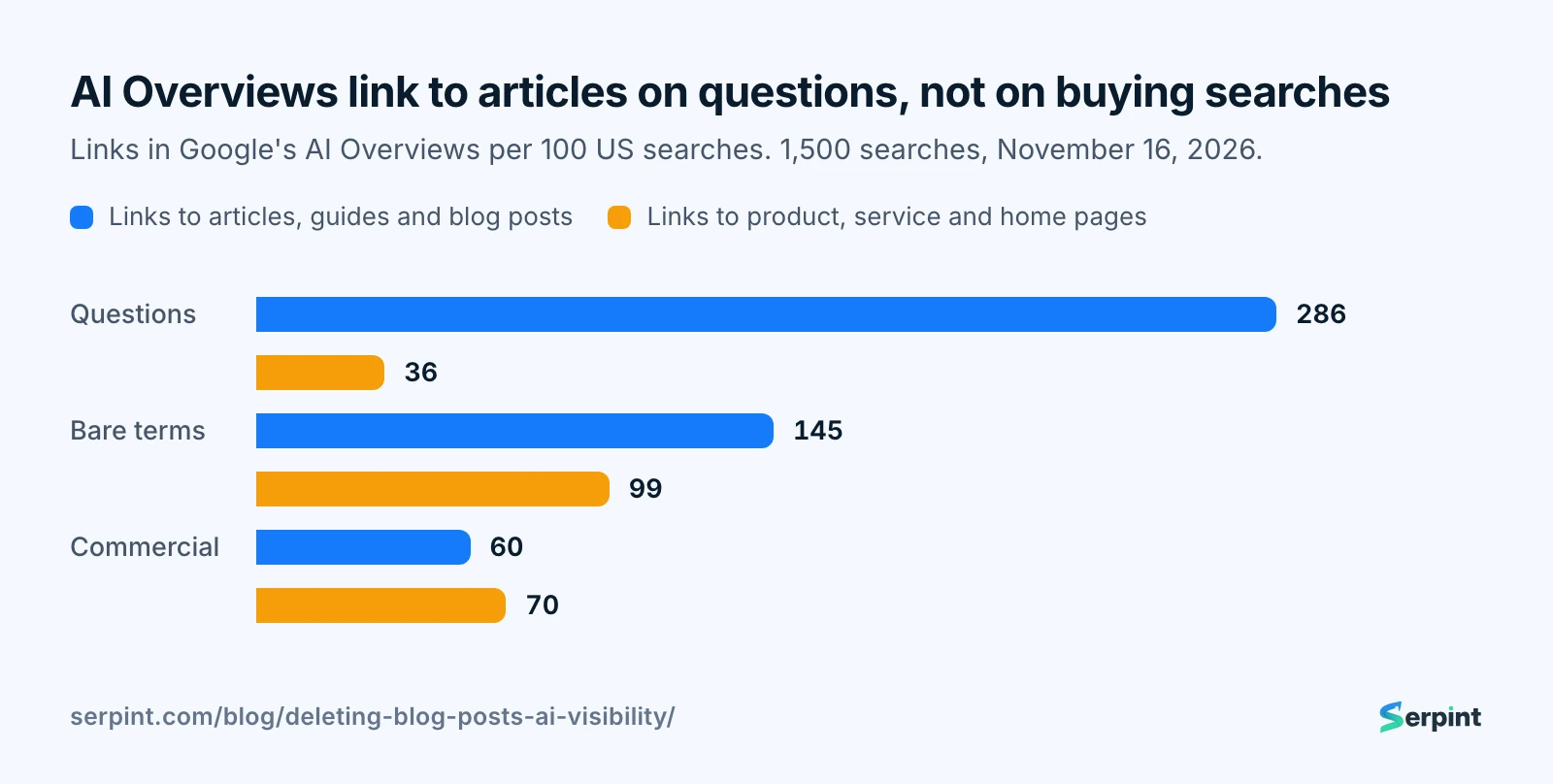
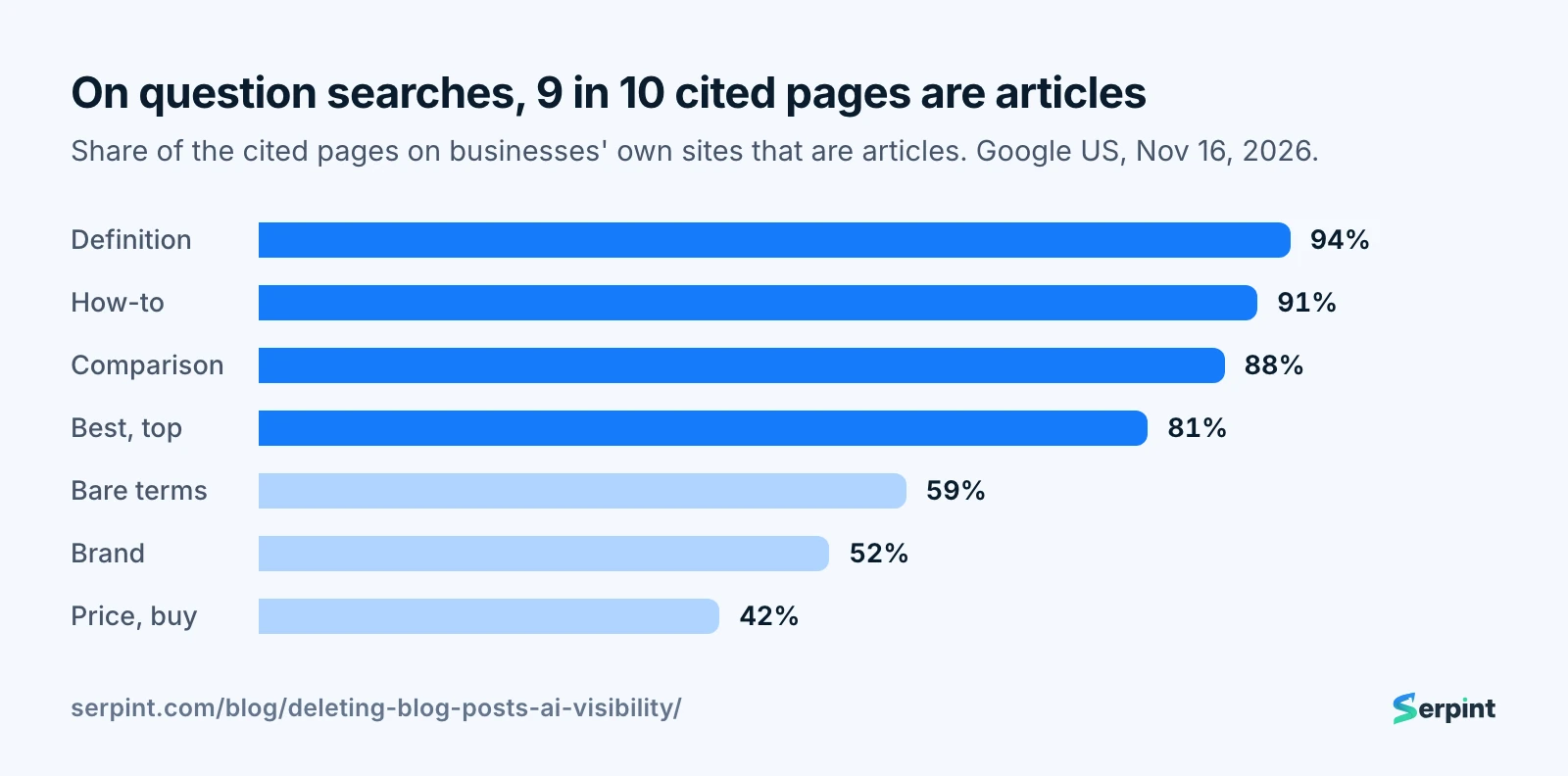
AI Overviews link mostly to articles when people ask questions, and to shops about as often as articles when they’re ready to buy. We sorted the 5,897 pages cited across 1,500 US searches in our AI Overview study, by kind of page and kind of search.
On informational searches, AI Overviews linked to articles 8 times as often as to product, service or home pages. That’s 286 against 36 links per 100 searches. On price, brand and near-me searches, the two were about even, 60 against 70.
Data: Serpint’s check of 1,500 Google US results pages, November 16, 2026.
Question searches also show far more overviews. 97.5% of them had one, against 70% of commercial searches and only 37% of near-me searches. Each overview on a question also cites more sources: 7.8 on average, against 4.5 on commercial searches.
Data: Serpint’s check of 1,500 Google US results pages, November 16, 2026.
Put together, a blog is where most sites’ AI impressions live. Delete it and they fall, exactly as they did here. Buying searches lean on it far less, and they’re the ones whose clicks pay.
💡 My take Most AI impressions on a blog are people who got their answer and left. A fall there is a reason to check your clicks, not a loss in itself. I’d worry far more about a drop in AI impressions on product and service pages.
That doesn’t mean deleting content is safe, so the next question is how to decide.
Should you delete blog posts that only earn AI impressions?
Delete a post only when it earns neither clicks, conversions nor links, and redirect it when a better page covers the topic. I wouldn’t have removed a whole batch at once. Merging and redirecting keeps whatever links and readers a post had, and makes the result easier to read.
Look at what a post does before cutting it. A how-to with few clicks may still start visits that convert, or earn the links your service pages rank with. A post about a US holiday on a London site is easier: its readers will never buy.
Either way, you need the two numbers side by side, and Search Console has both.
How do you measure AI visibility in Search Console?
Search Console’s Generative AI report shows how often links to your pages appeared in AI Overviews and AI Mode. Google rolled it out to all sites by August 31, 2026, under Performance. It counts impressions by page, country, device and date.
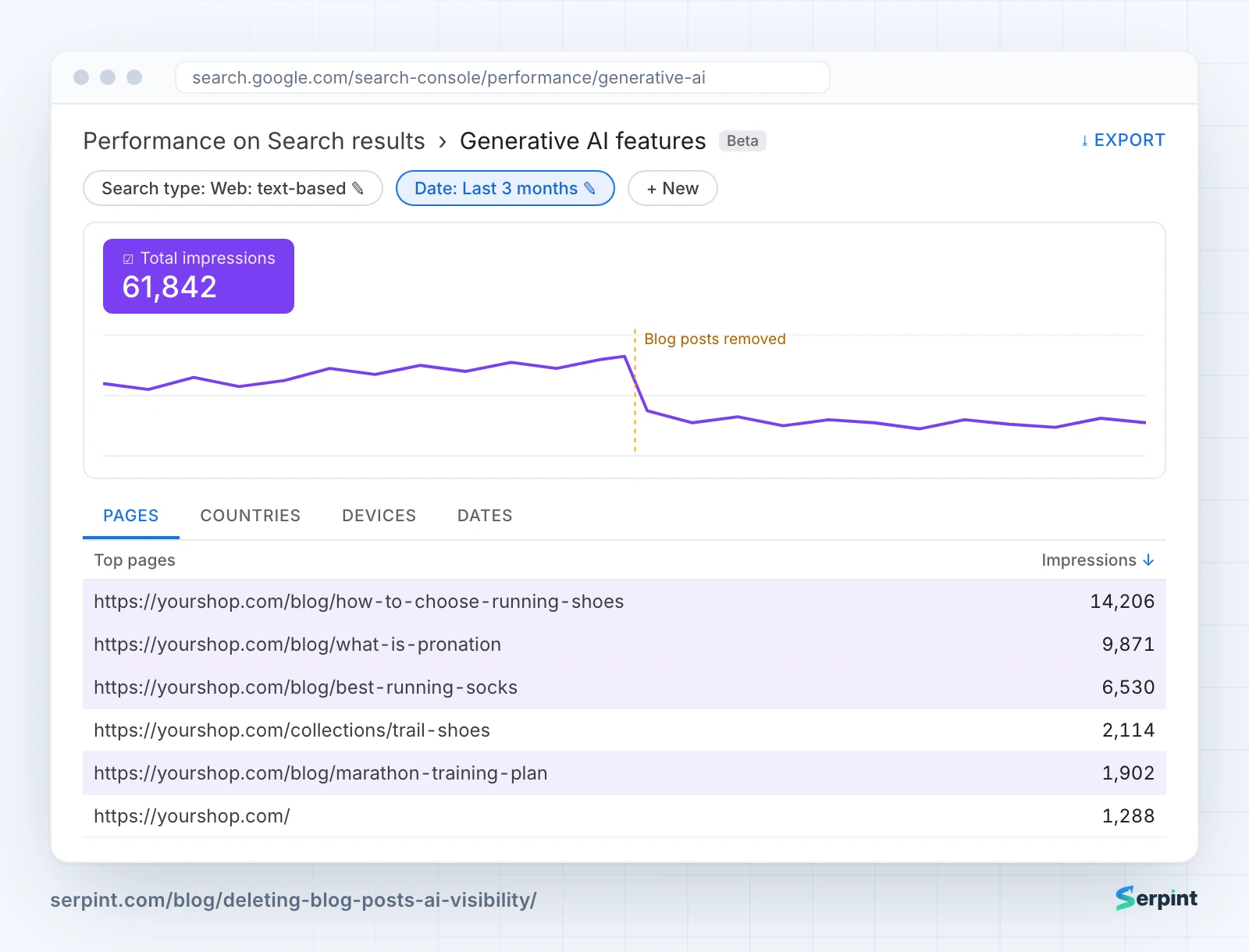
Search Console’s Generative AI features report, redrawn with sample data.
The report has no clicks, no queries and no positions, as Google’s help page says. That’s the gap the case study filled by hand. Both reports export by page, so you can join them.
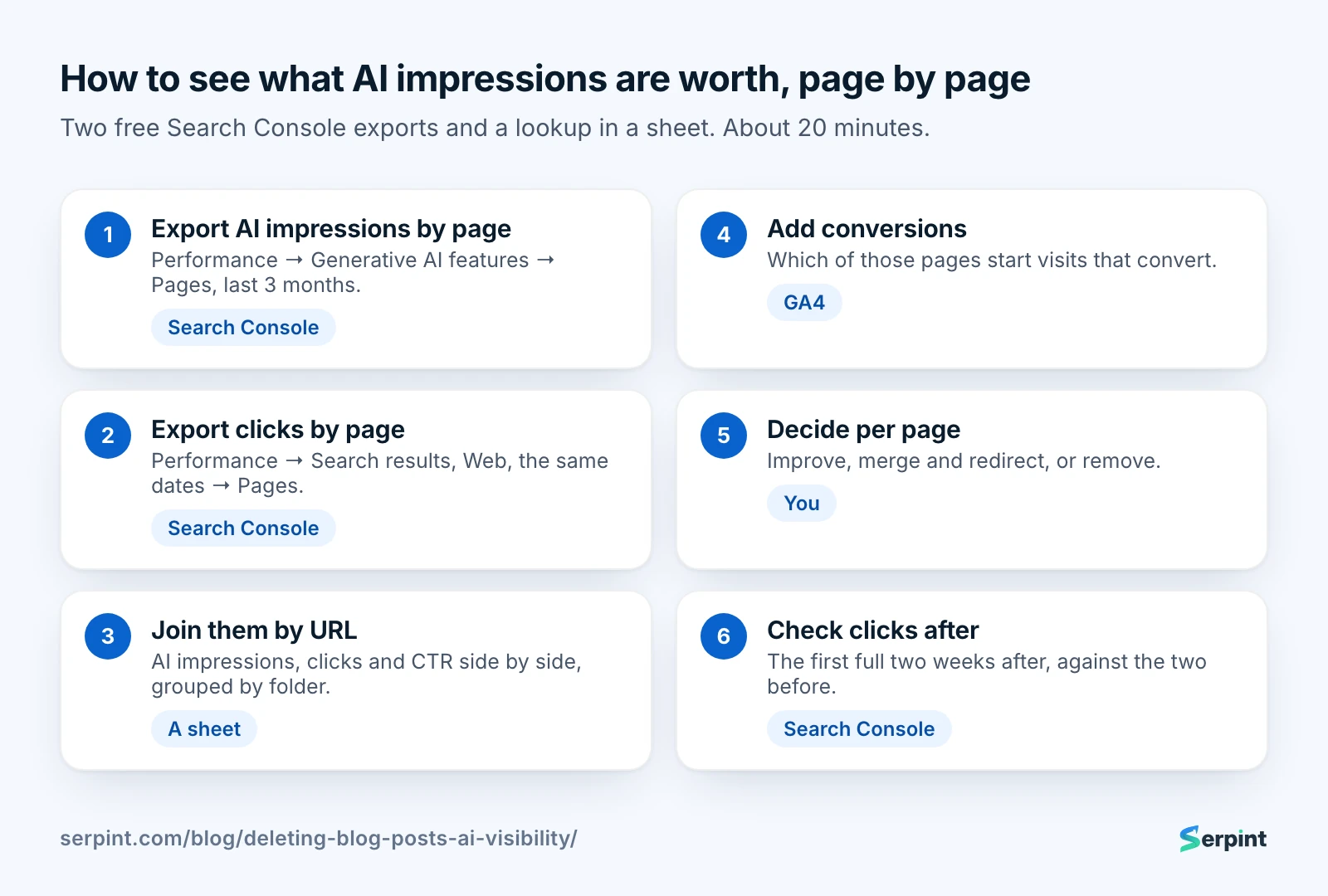
Step 1: export AI impressions by page. Open Performance, then Generative AI features, pick the last 3 months and export the Pages table.
Step 2: export clicks by page. Open the Search results report with the same dates and the Web search type, and export its Pages table.
Step 3: join them by URL. Put both in a sheet and add each page’s clicks next to its AI impressions. Group the pages by folder, such as /blog and /products, to see where the AI impressions sit.
Step 4: add conversions. In GA4, check which of those landing pages start visits that convert.
Step 5: decide per page. Improve pages with clicks, merge or redirect thin ones that overlap, and remove only what earns nothing.
Step 6: check clicks after. Compare the first full two weeks after the change with the two weeks before, on the pages that remain.
That’s the free way, and it only covers Google. For ChatGPT and other assistants, people buy prompt trackers, which have a different problem.
Can you trust prompt-based AI visibility trackers?
Prompt trackers can’t be trusted as a monthly score, because AI answers change almost every time you ask. In SparkToro’s test of 2,961 answers, ChatGPT or Google’s AI returned the same list of brands twice less than 1 time in 100.
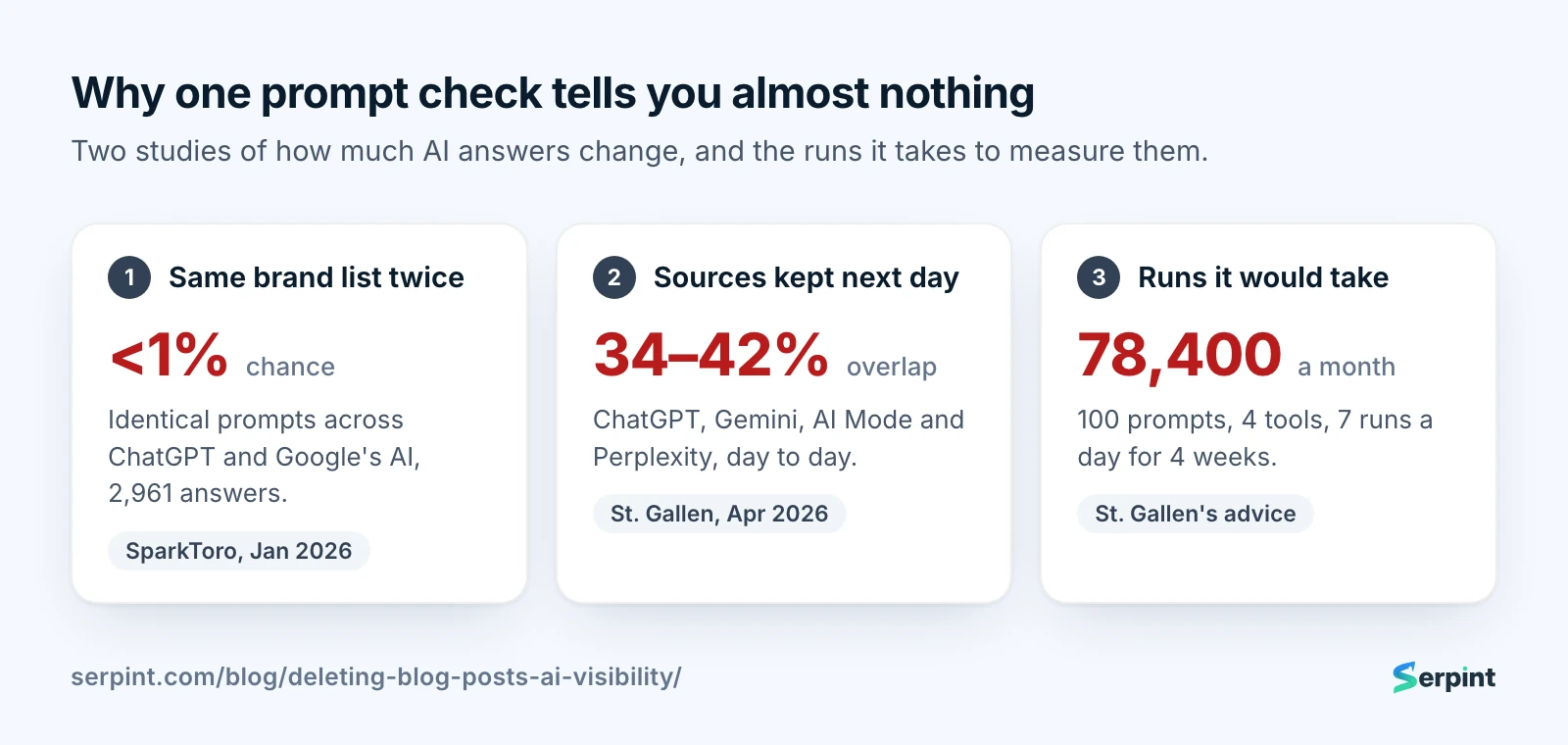
Data: SparkToro and the University of St. Gallen.
A University of St. Gallen study found only 34% to 42% of cited sources stay the same from one day to the next. It calls a single run “essentially uninformative.”
The study recommends at least 7 runs per prompt a day, over two to four weeks. For 100 prompts on four tools, that’s 78,400 runs a month.
We tested Google’s AI Overviews the same way. Fetched again 9 minutes later, 63% cited exactly the same pages. Four days later, only 14% did, and on average 44% of their sources overlapped. Google changed its model between those dates, so part of that churn is the model.
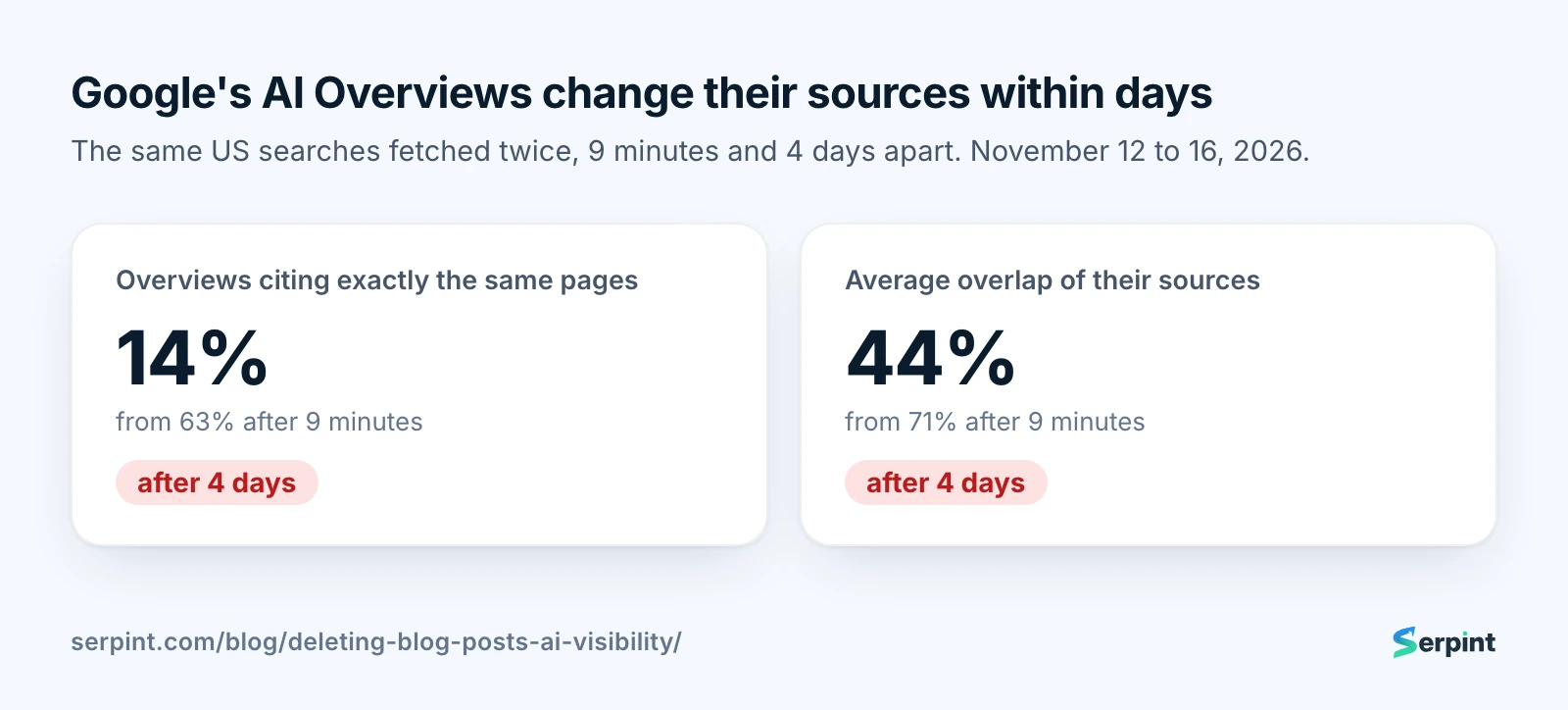
Data: Serpint’s repeat checks of the same Google US searches, November 12 and 16, 2026.
Then there’s the problem money can’t fix: the prompts are made up. Nobody knows what people type into ChatGPT, so a tracker measures the questions you wrote yourself.
✅ My advice Use a prompt tracker for research: which competitors get named and which sites get cited. For Google, measure real searches you know people make, and always next to their clicks.
Our own checks share one limit: a single fetch per keyword per check. That’s why Serpint shows them next to clicks, never as a score.
How can Serpint tie AI citations to clicks?
Serpint checks your tracked keywords, real searches with real search volume, and records whether Google’s AI Overview cites you. Each keyword sits next to its Search Console clicks and estimated conversions.
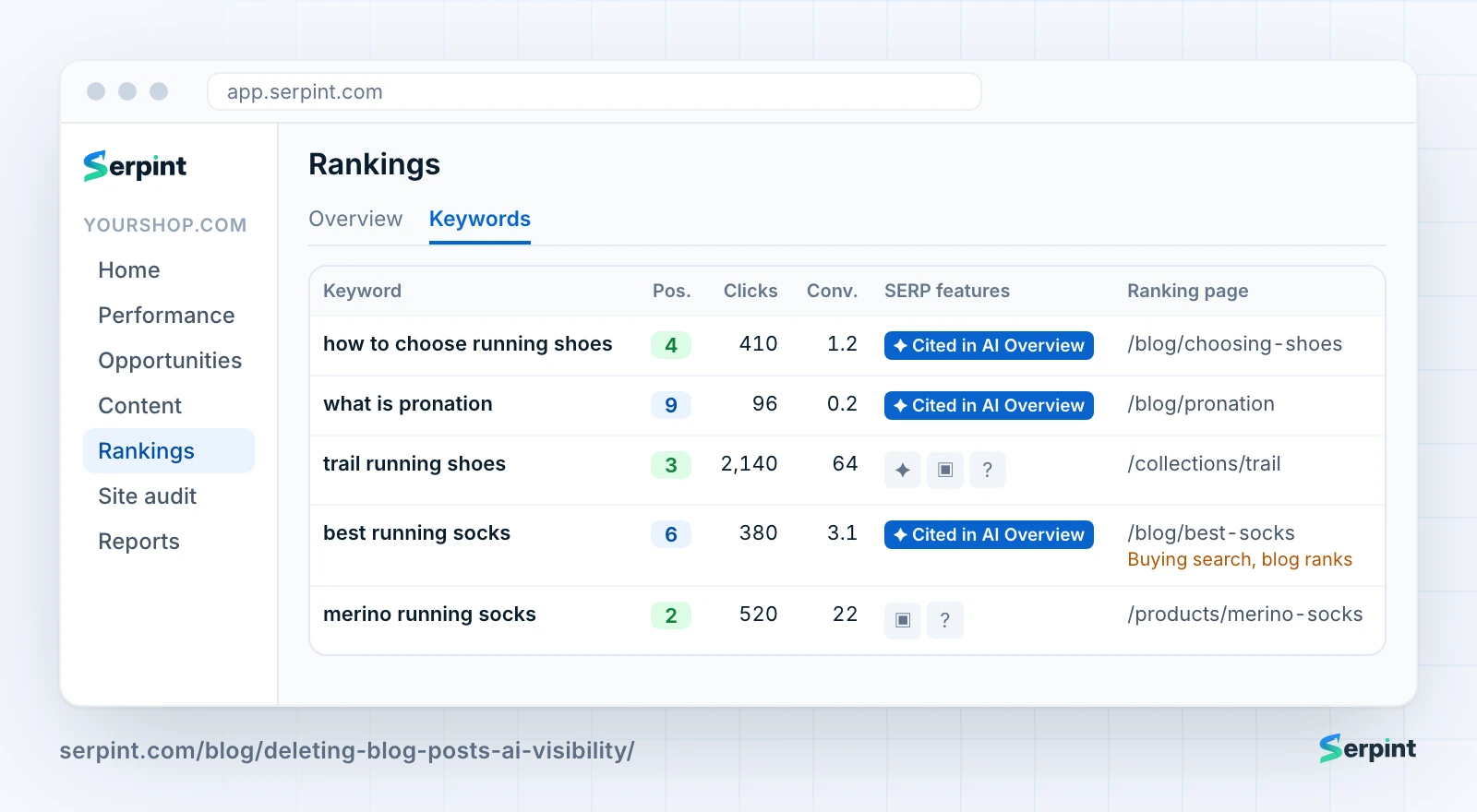
In Rankings, a keyword shows “Cited in AI Overview” when the overview links to you, with its last 28 days of clicks and conversions. A blog post ranking for a buying search gets flagged. Opportunities lists top-10 keywords whose AI Overview doesn’t cite you.
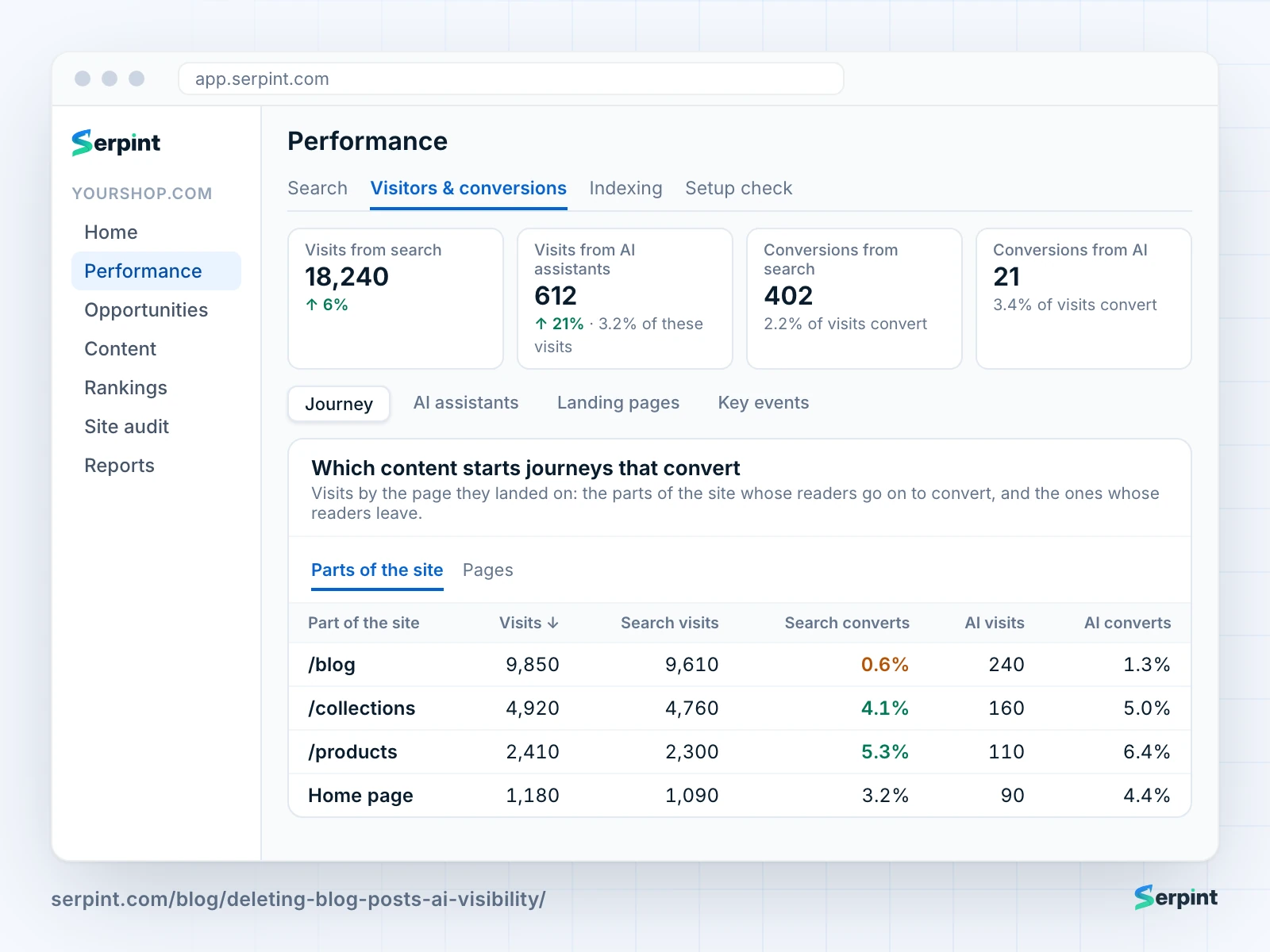
Performance answers the pruning question directly. “Which content starts journeys that convert” splits visits by part of the site, from search and from AI assistants, with how often each converts.
For articles you mark as published, Serpint also checks whether ChatGPT cites the page a week later, then every 30 days.
How much of this matters depends on the kind of site you run.
What does it mean for your kind of site?
Online stores: your AI impressions sit mostly on guides, and your sales on collection and product pages. Keep guides that start converting visits, and redirect the rest to the category they serve.
Publishers: articles are the product, so AI impressions are your exposure. Watch clicks per page, since an overview that answers fully can take them.
SaaS and B2B: comparison and “what is” posts carry AI visibility and often first touches. Check conversions over a longer window before cutting them.
Local businesses: only 37% of near-me searches showed an overview in our data. Your service and location pages matter far more than AI impressions.
Agencies: report AI impressions next to clicks for the same pages, never alone. A client who sees only a falling AI score will ask the wrong question.
What should you do now?
Start by exporting Search Console’s Generative AI report and Performance report by page, for the same three months. Join them and group the pages by folder.
Then add conversions from GA4, and mark each post to keep, improve, merge and redirect, or remove. Change a batch at a time and compare clicks two weeks before and after.
Finally, if you pay for an AI tracker, use it for competitors and sources, not as your monthly score.
Founder of Serpint
Founder of Serpint. 6+ years in SEO and content marketing and 2 in GTM engineering, most recently as Head of Product and Content at lobstr.io, a B2B SaaS web scraping platform, until October 2026. Writes about SEO, AEO and GEO, the full stack of search and AI answer optimization, and content marketing.