News
ChatGPT Business Hub is live: OpenAI's own Search Console
OpenAI launched ChatGPT Business Hub: your mentions, profile views and clicks from ChatGPT. What each number counts, and how to check it against GA4.

· 7 min read
OpenAI launched ChatGPT Business Hub in beta on November 10, 2026. It’s Search Console and Business Profile for ChatGPT in one place: claim your business, then see its mentions, profile views and clicks. I think the clicks are the most useful AI number yet, but they won’t match your analytics.
OpenAI announced it as part of Businesses in ChatGPT. Search Engine Roundtable reported it first, and Barry Schwartz claimed his own company’s listing within hours. He had no data to show yet, which is normal: the numbers need time and a verified account.
So before the numbers, here’s what Business Hub is and how to get in.
What is ChatGPT Business Hub?
ChatGPT Business Hub is where a company claims and manages its listing in ChatGPT. Once verified, you can update your details, connect a product feed and see insights. OpenAI says 1.2 billion people use ChatGPT each week, which is why the listing matters.
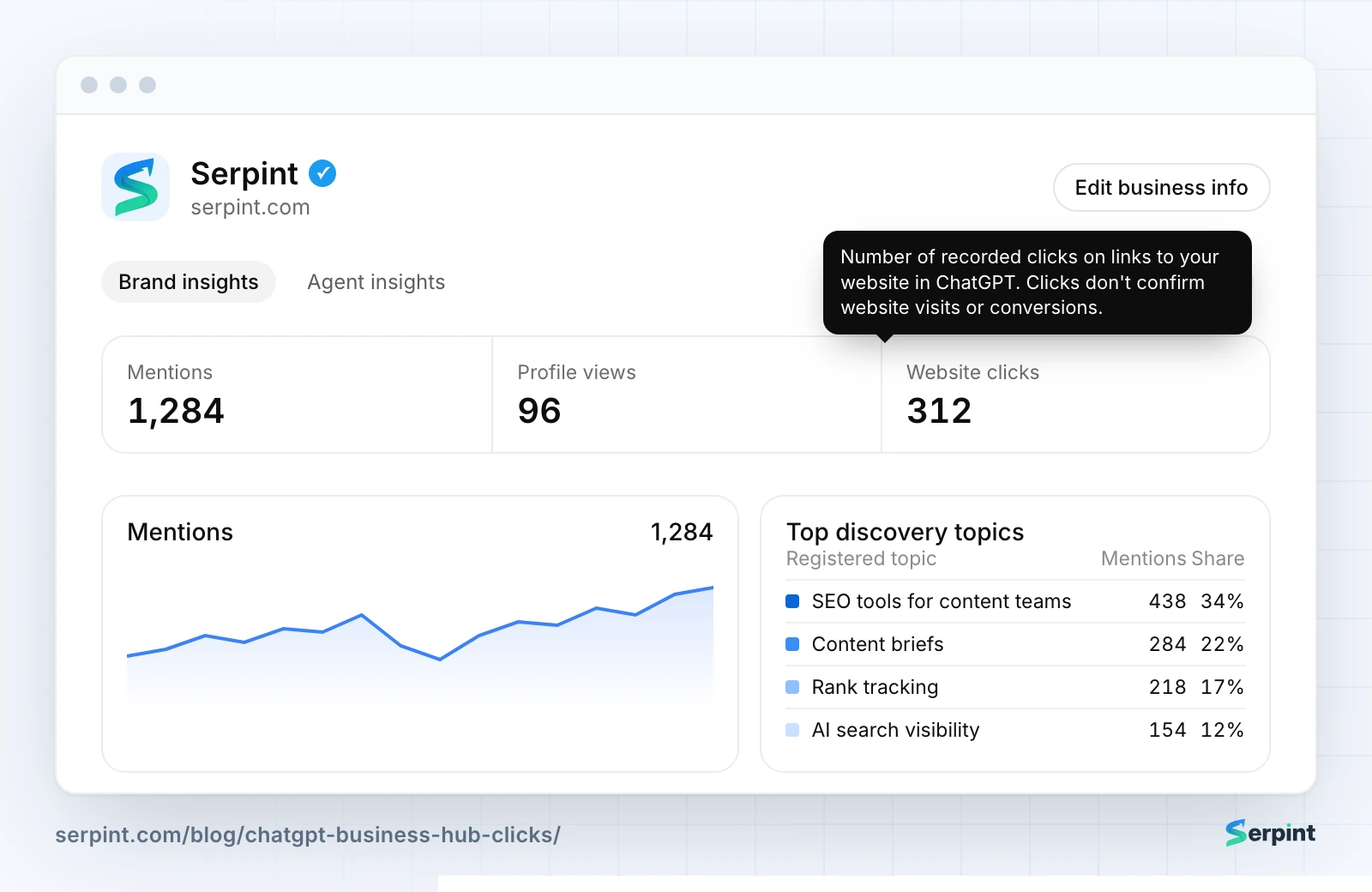
Redrawn from ChatGPT Business Hub, with Serpint as the example and sample data.
US online stores and online service businesses can also publish a Business Agent. It’s a separate, clearly labeled chat that answers customer questions from the information you provide.
None of it works until you’ve claimed your business, so that comes first.
How do you claim your business?
You claim your business from Business Hub in ChatGPT’s sidebar. Search for your listing, then verify it with your business phone, a business email, a DNS record on your domain or your Shopify store. OpenAI reviews every claim before it goes through.
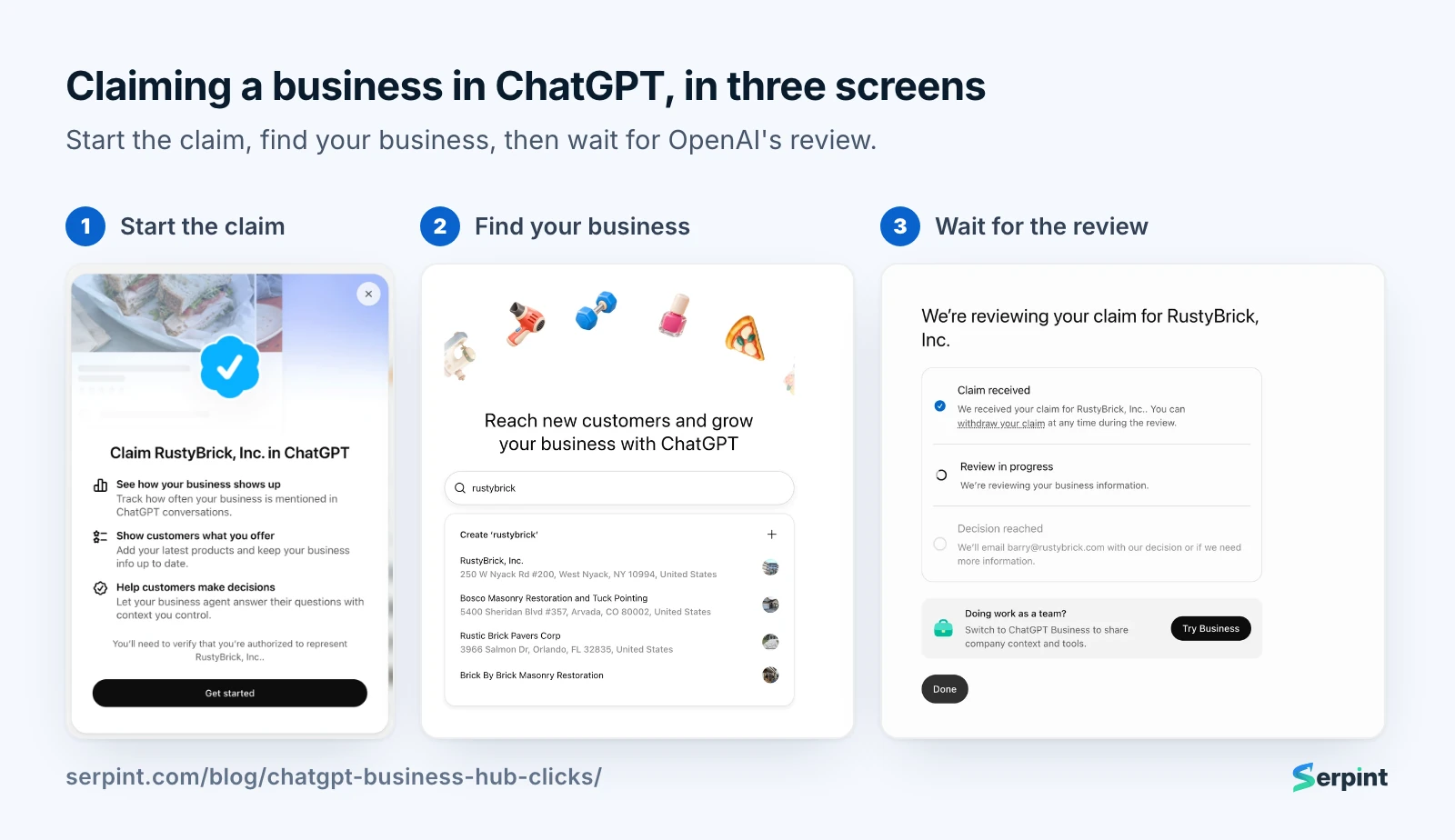
CC: Barry Schwartz
Seeing the numbers takes one more step. You must pass an identity check with Persona first. It may ask for a government ID, business registration and proof that you can act for the company.
My advice is to claim your listing this week, even before you care about the numbers. Barry worried in his post about people hijacking listings, and I share that worry. The verified owner controls what ChatGPT says about the business, so it should be you.
Once you’re in, the numbers are where it gets interesting, and where they’re easy to misread.
What do mentions and clicks actually count?
Business Hub’s insights cover the past 7 or 28 days, and each number is narrower than its name. Here is how OpenAI’s help page defines them:
| Number | What it counts | Keep in mind |
|---|---|---|
| Mentions, online business | ChatGPT references your website | Your brand name alone isn’t counted |
| Mentions, local business | ChatGPT shows your location as a result | Counted even if nobody opens it |
| Profile views | People opening your business profile | Shown next to mentions and clicks |
| Website clicks | Clicks on links to your site inside ChatGPT | A click isn’t a confirmed visit |
| Discovery topics | Themes in answers that cited you | Not the prompts people typed |
A blank number isn’t a zero. Figures appear only above a reporting threshold, and OpenAI doesn’t publish where it sits.
I wouldn’t report mentions to a client or a boss as “AI visibility”. A brand that ChatGPT recommends by name without linking to it isn’t counted, so strong brands can look invisible. Clicks are the honest number here.
Discovery topics are the part I’d use most. They show which themes ChatGPT ties to your site, which is a ready-made list of topics to write about next.
Clicks are the number most people will hold up against their analytics. They won’t line up, and the reason matters.
Why won’t the clicks match Google Analytics?
The clicks won’t match because the two tools count different moments.
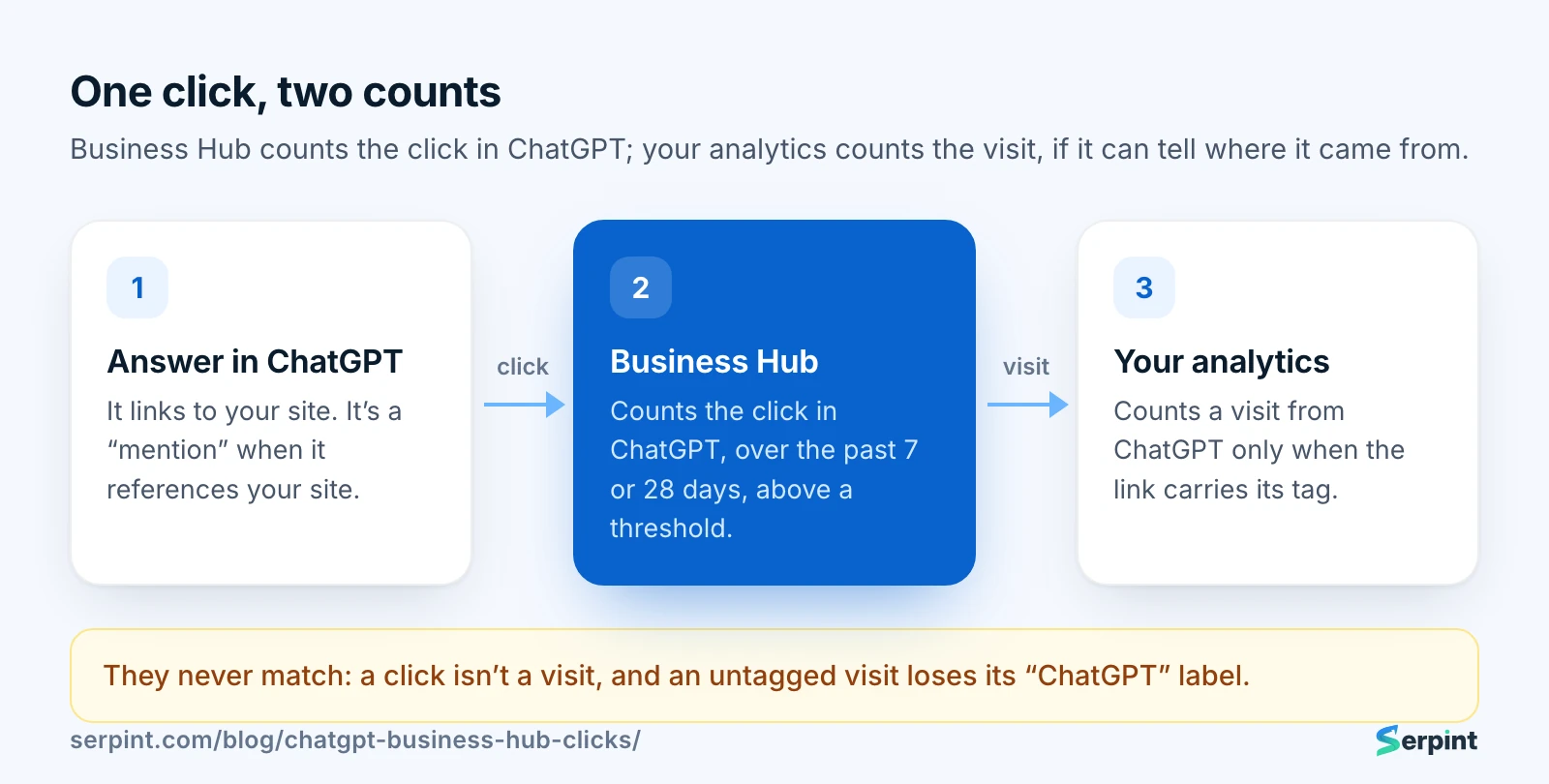
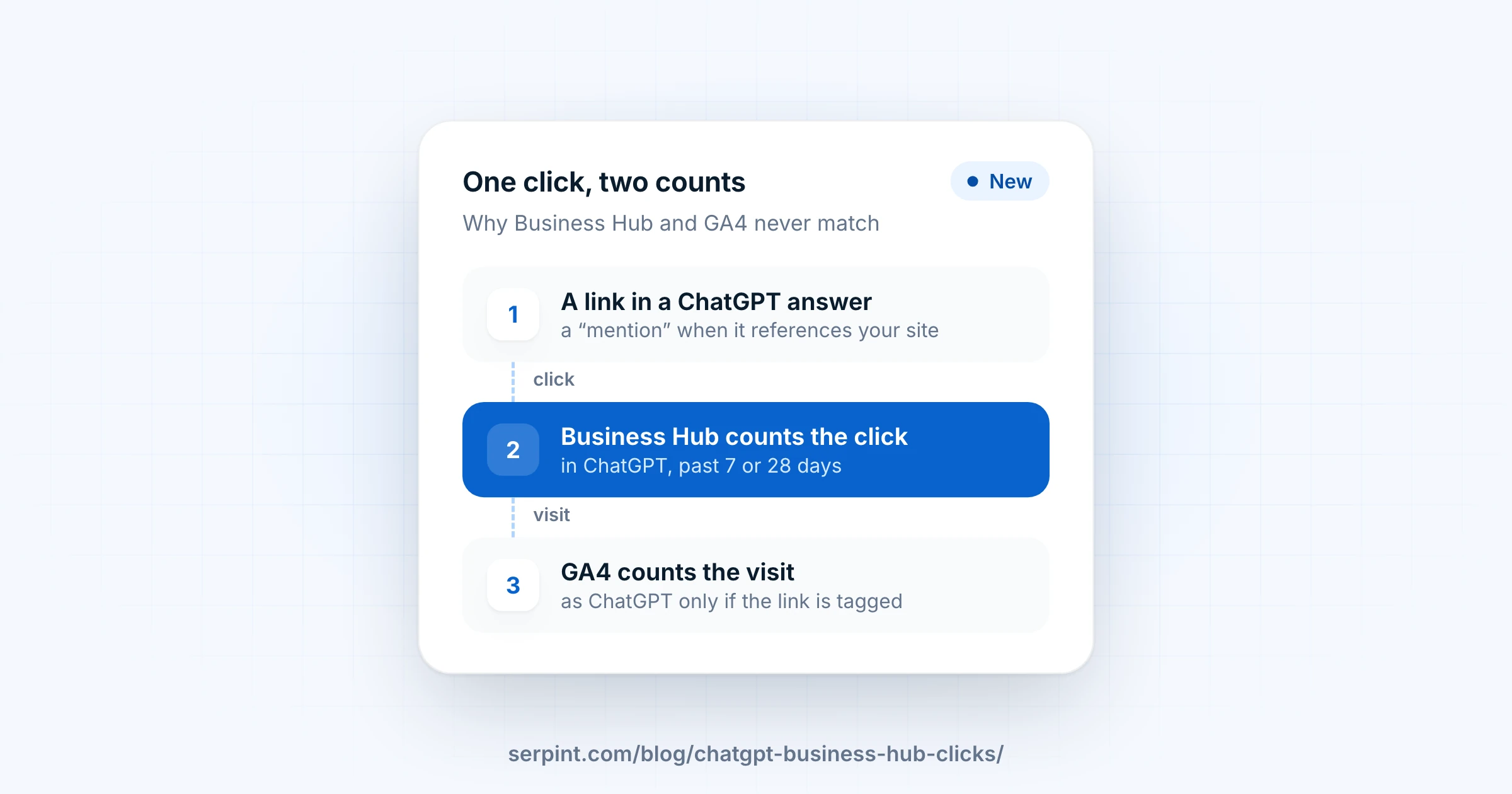
Business Hub counts the click. Your analytics counts the visit, if it can tell where it came from.
Business Hub records the click inside ChatGPT. Your analytics records a visit only after the page loads and it recognizes ChatGPT as the source. The dashboard’s own tooltip says it plainly: “Clicks don’t confirm website visits or conversions.”
Recognizing the source mostly depends on a tag ChatGPT adds to its links, utm_source=chatgpt.com. That tag isn’t guaranteed. Profound measured it missing from most cited links between October 8 and 16, 2026. During that week, ChatGPT visits would have looked lower even though people kept arriving.
That’s why I’d watch the ratio between the two numbers, not either one alone. If Business Hub’s clicks hold steady while GA4’s ChatGPT visits drop, the tag broke, not your traffic.
💡 My take ChatGPT is starting to look like the new Google. Business Hub is its Search Console and Business Profile in one, plus product feeds and a chat agent. I’d bet Gemini and Perplexity ship their own within a year.
It isn’t Google yet, though, and what the dashboard leaves out matters as much as what it shows.
What does Business Hub leave out?
Business Hub covers ChatGPT only. It says nothing about Google’s AI Overviews and AI Mode, Gemini, Perplexity, Copilot or Claude.
It shows no competitors either. You see your own mentions, not how many answers in your category named someone else. A rising count can hide a shrinking share. In other words, it’s ChatGPT grading its own homework, with no class average to compare against.
Brands sold through retailers can be undercounted. When ChatGPT names your product but links to a store, the store gets the mention, as Profound points out.
Not every business can join yet. Profound reports that service businesses were marked as coming soon at launch, which leaves out most software companies for now.
Whether you can join or not, your own analytics already holds most of this story. Here’s how to find it in GA4.
How do you find ChatGPT visits in GA4?
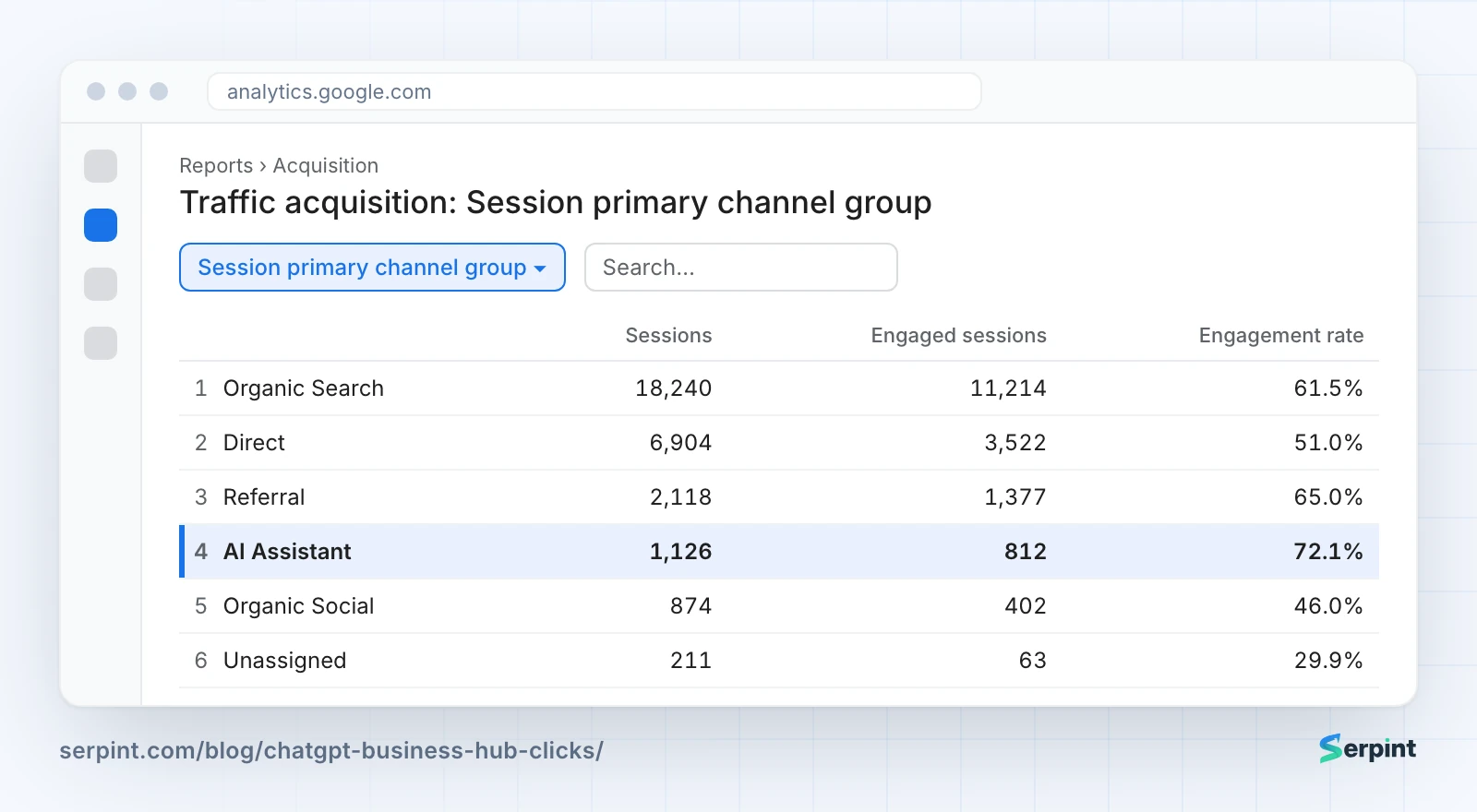
Start in GA4’s own channel report, then catch the visits it files elsewhere. GA4 has an AI Assistant channel for visits from assistants such as ChatGPT, Gemini, DeepSeek, Copilot and Grok. Google’s AI Overviews and AI Mode aren’t in it: they count as Organic Search.
- Open Reports → Acquisition → Traffic acquisition. In the table’s first column, choose Session primary channel group and find the AI Assistant row.
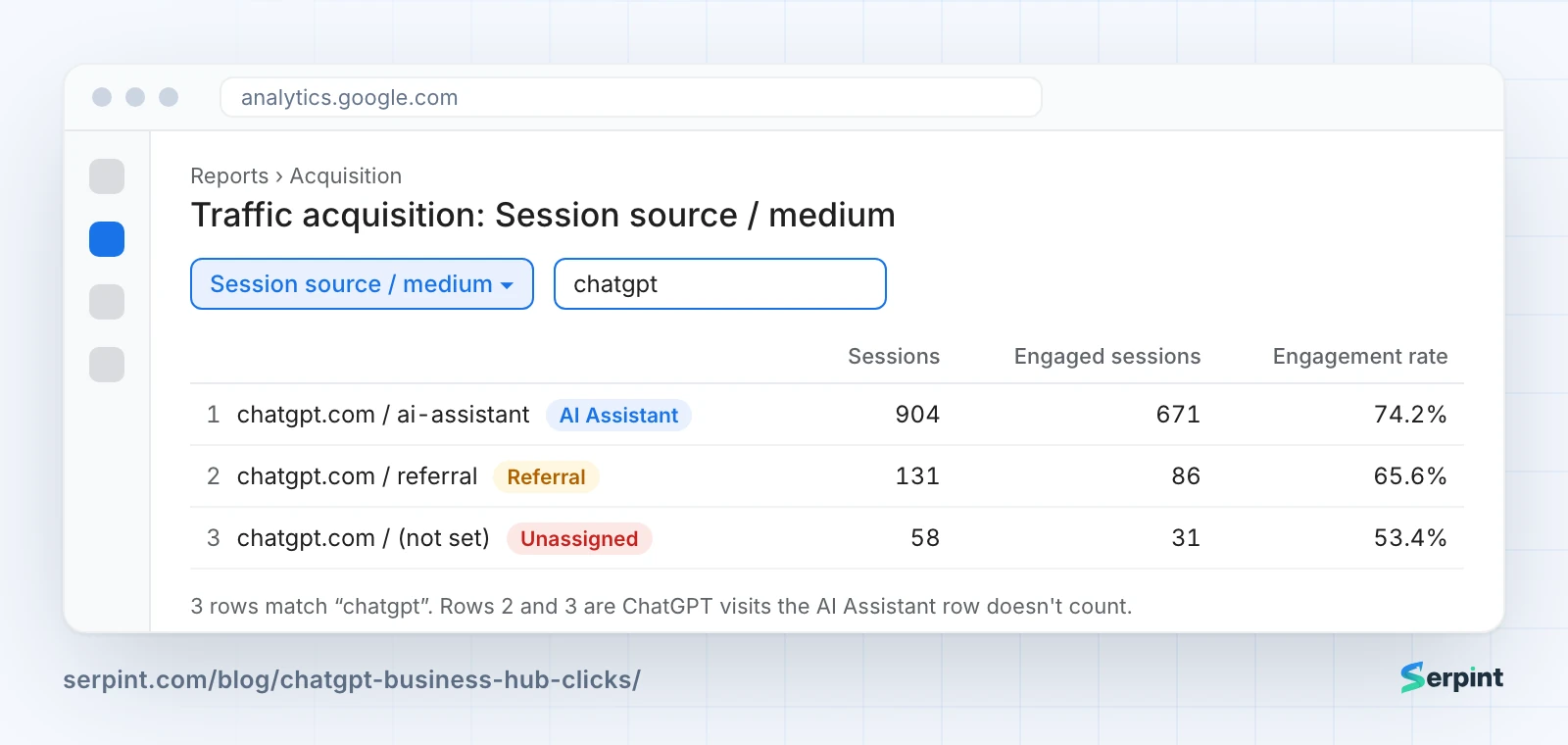
- Switch that column to Session source / medium and type
chatgptin the search box. This shows every ChatGPT visit GA4 recognized, including any it filed under Referral or Unassigned.
- To follow it over time, create an exploration with a filter on Session source matching the regex
chatgpt|openai, and plot sessions by week.
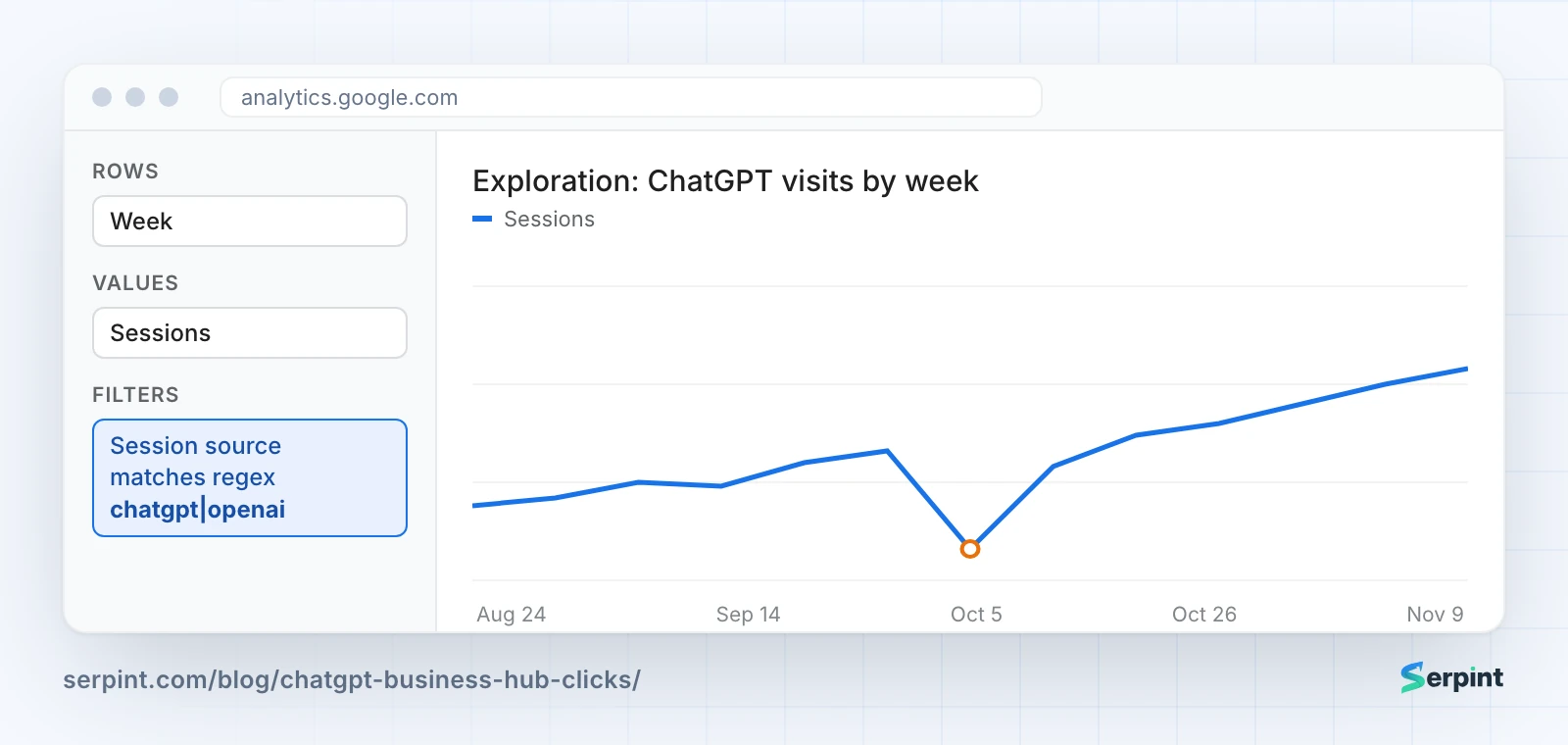
GA4 illustrations with sample data.
GA4 puts a visit in the AI Assistant channel only when it arrives from a referrer it knows as an AI assistant. A visit with no tag and no referrer lands in Direct, and nothing in GA4 can recover it. That gap is why Business Hub’s clicks will usually run higher than GA4’s ChatGPT visits.
That’s three reports and a regex, for one assistant, every week. You don’t need that much of a workout: Serpint does it for you, for every assistant at once.
How can Serpint track AI visits for you?
Serpint tracks visits from every AI assistant for you, straight from your GA4. Its Performance page splits visits from search and from AI assistants, then lists each one: ChatGPT, Perplexity, Gemini, Copilot, Claude and others, including the visits GA4 files under Referral.
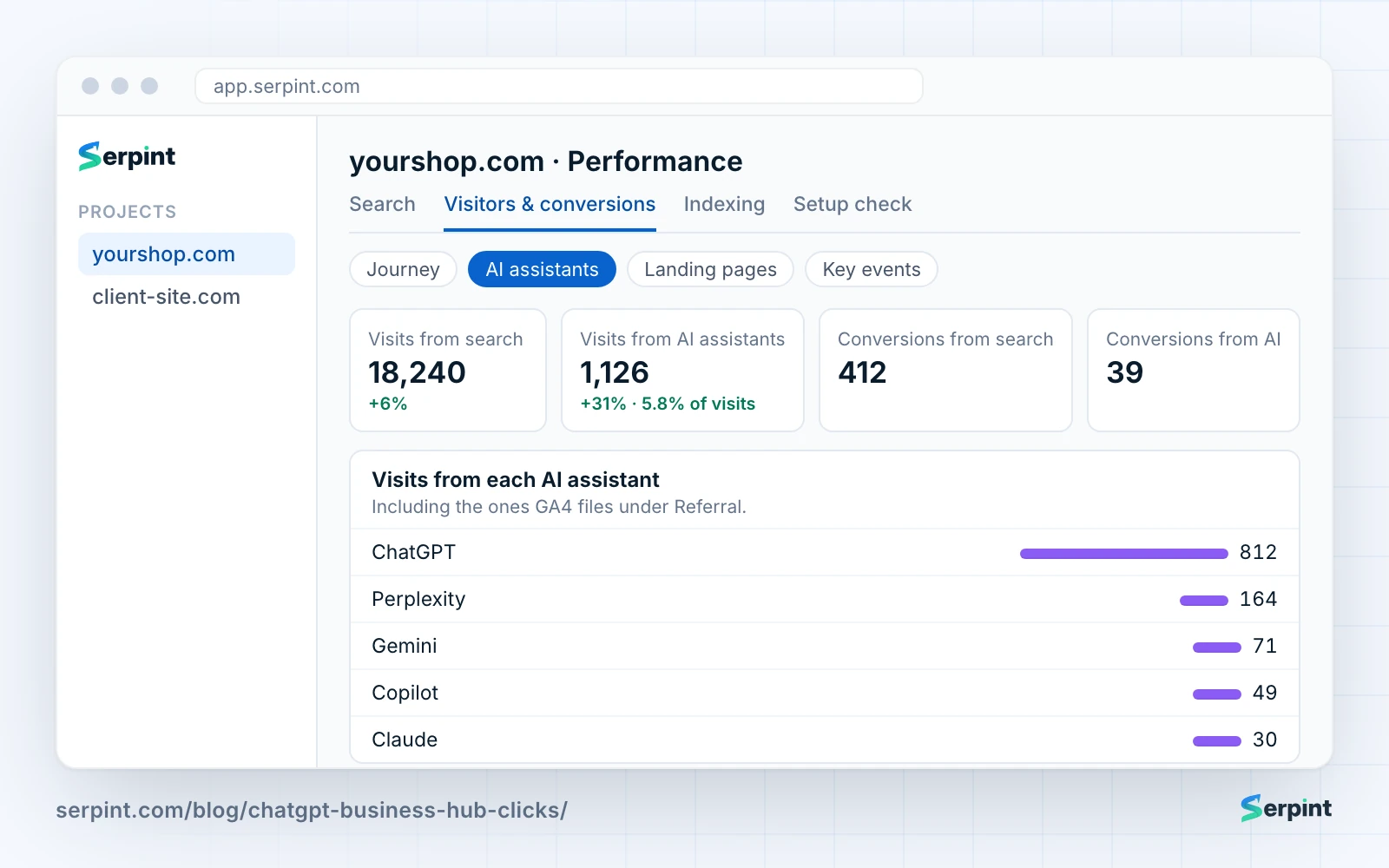
It also checks whether ChatGPT cites what you publish. Mark an article as published and Serpint asks ChatGPT its keyword a week later, then every 30 days, and records whether the answer cites your page.
How much any of this matters depends on the kind of site you run.
What does it mean for your kind of site?
Online stores have the most to gain right now. They can claim a listing, connect a product feed, and in the US publish a Business Agent that answers shoppers’ questions.
Local businesses get mentions whenever ChatGPT shows their location, even without a click. Claiming the listing keeps hours, address and details current in those answers.
SaaS and other service companies may not be able to sign up yet. Until they can, the GA4 steps above are their Business Hub.
Agencies can claim listings for clients they’re authorized to represent, since the identity check asks for proof of that authority. Report Business Hub’s clicks next to GA4’s visits, and explain why the two differ.
Whatever your site, the next steps are the same.
What should you do now?
Start by claiming and verifying your listing if you’re eligible, so the counts begin. The data only starts once the identity check passes.
Then compare trends, not totals. If Business Hub’s clicks hold steady while ChatGPT visits in GA4 fall, check the tag before you change any page.
Finally, treat both numbers as a floor. Many people see a brand in an answer and come back later another way, without any click to count.
Founder of Serpint
Founder of Serpint. 6+ years in SEO and content marketing and 2 in GTM engineering, most recently as Head of Product and Content at lobstr.io, a B2B SaaS web scraping platform, until October 2026. Writes about SEO, AEO and GEO, the full stack of search and AI answer optimization, and content marketing.